Some of the Best Splunk Marketing Slogans Extracted from Splunk.exe

If you have ever been to a conference with a Splunk booth you will have noticed their t-shirts. They are all black with a cool slogan printed in white. When you have been working with Splunk for some time you will notice that it has a very powerful commandline tool, splunk.exe. You can use that to tell Splunk’s deployment server component that one or more apps have changed, for example, with this command: splunk.exe reload deploy-server.
Logs & Metrics

Solved: Citrix Desktop Service Fails to Start, Logs Event 1006

Solved: Citrix Desktop Service Fails to Start, Logs Event 1006
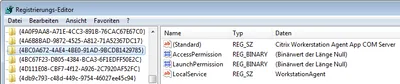
I am sure you all love XenDesktop VDAs that just won’t register. Although this is becoming less and less of a problem I had another case recently. Checking the Obvious When a XenDesktop VDA is unregistered the first thing I do is check if the VM is actually turned on. With that out of the way I turn to the application event log, looking for entries with the source Citrix Desktop Service. This usually tells you what the problem is. Not this time, however. Apparently the Citrix Desktop Service (aka WorkstationAgent) ran into some error during startup. It logged the following event with ID 1006 and stopped:
Citrix/Terminal Services/Remote Desktop Services

Configuring Citrix ShareFile Sync from PowerShell

Configuring Citrix ShareFile Sync from PowerShell
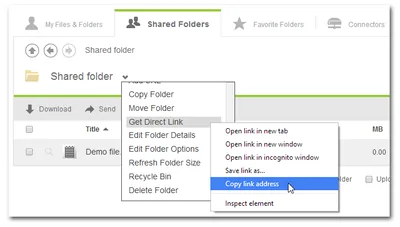
When you have a cloud-based file sharing service it makes a lot of sense to synchronize part or all of the data with your desktop computer. Citrix ShareFile offers the Sync for Windows tool for that purpose. However, once you open its configuration screen you notice that has a severe restriction: it can only synchronize to a single local folder. In many cases it would make much more sense to synchronize different cloud folders to different locations on your hard disk. When I complained to the product manager Peter Schulz about this I learned about a hidden gem: the single folder restriction is only present in the UI; the underlying sync engine is much more flexible. And the best thing is: the sync engine can be configured from PowerShell. Here is how.
Citrix/Terminal Services/Remote Desktop Services

Remote Management of Windows PCs in an Isolated Security Zone

Remote Management of Windows PCs in an Isolated Security Zone
With the advent of BYO it has become fashionable to regard PCs as untrusted devices that should be isolated in a dedicated security zone. Zoning Such an approach has a big advantage: by separating clients from servers it is possible to treat them differently and potentially apply more relaxed security policies - which is a basic requirement for BYO. In a truly BYO-only environment you block everything except Citrix ICA or some other remoting procotol of choice at the firewall and life is good. In real corporate networks things are a bit more complicated, however. Say you want to isolate your managed Windows PCs. In that case you might want to be able to manage them remotely from systems outside the client security zone (e.g. from management terminal servers). And suddenly you have a problem: Windows management protocols, especially RPC and DCOM, are not exactly firewall-friendly.
Security

Persistent VDI in the Real World - Storage

Persistent VDI in the Real World - Storage
This is the second article in a multi-part series about building and maintaining an inexpensive scalable platform for VDI in enterprise environments. Previously in this Series I started this series by defining requirements. Without proper requirements, everything else is moot. Remember that we are looking at running typical enterprise desktop workloads, we are trying to centralize desktops and our primary desktop hosting technology is multi-user Windows, aka RDS/XenApp.
Citrix/Terminal Services/Remote Desktop Services

Persistent VDI in the Real World - Architecture

Persistent VDI in the Real World - Architecture
This is the first article in a multi-part series about building and maintaining an inexpensive scalable platform for VDI in enterprise environments. Requirements Before we can even start to think about a possible architecture, we need requirements. Only requirements enable us to make choices that benefit the customer. Without proper requirements we are not building for the real world but for some alternate reality. Please keep in mind when reading this article that the solution presented here only makes sense for you if your requirements are similar.
Citrix/Terminal Services/Remote Desktop Services

Shutting Down Unused Persistent XenDesktop VMs

Shutting Down Unused Persistent XenDesktop VMs
When you use XenDesktop the only way it makes sense you may find that Citrix has not really put much effort into making that a smooth experience. Persistent is a Second-Grade Citizen XenDesktop is really designed to be used with pooled desktops - machines that are reset to a pristine state when the user logs off. Of course, stateless desktops are much better (and, importantly, cheaper) served from XenApp. This has been the topic of many a debate which I will not repeat here. But I will state that if you give a so-called knowledge worker a personal desktop, you better make sure that desktop is persistent.
Citrix/Terminal Services/Remote Desktop Services

Error Message Explained: User Profile Service Failed the Logon

Error Message Explained: User Profile Service Failed the Logon
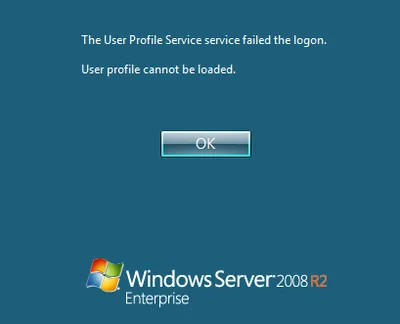
This article is part of Helge’s Profile Toolkit, a set of posts explaining the knowledge and tools required to tame Windows user profiles. Many errors related to user profiles result in the user getting a temporary profile instead of the regular local or roaming profile. I have written about possible causes for that here. In addition to that, there is an entirely different category of errors that occur when even a temporary profile cannot be created. This article describes likely causes.
User Profiles