Solved: Deleting Copied Executable Files Fails - Temporarily

I had a very interesting case recently where copied EXE files could not be deleted. They would simply remain in the folder like zombies, only to disappear a few minutes later.

The issue was reproducible across reboots and even across computer models. It looked like this:

Copy some files from the Windows directory to a test directory:
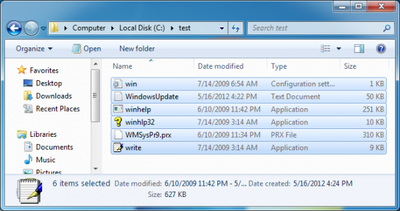
Files copied

Shift-delete all files (real delete, not moving them to the recycle bin). Some or all of the executables remain:
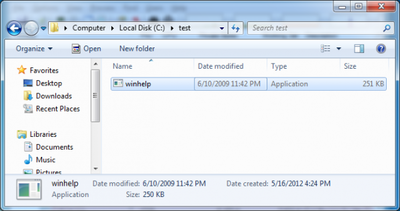
After delete files remain

A few minutes later, the files would finally disappear:
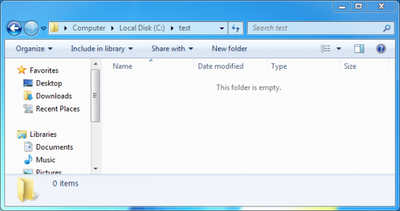
Folder empty

Such cases are always caused by a process holding open a handle to the “zombie” file. Finding the culprit is easy with Sysinternals Process Explorer. It is unfortunate, though, if it is “System” as in this case:
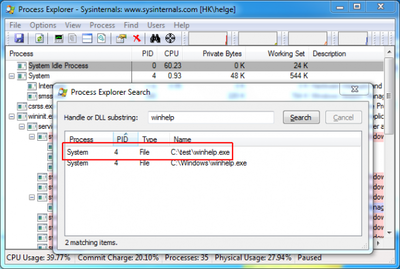
Open handle in Sysinternals Process Explorer

This happened on a hardened Windows installation image where many services had been disabled. By trial and error I found the root cause: it seems that disabling the Application Experience service is not such a good idea after all:
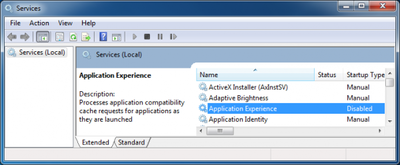
Application experience service disabled

The Application Experience service had been disabled because the German BSI (a government institute for IT security) recommends it. Microsoft apparently does not. Better stick with what the OS vender says, I guess…
Comments

Related Posts

Azure DevOps: Restricting Credentials to a Single Repository

Azure DevOps: Restricting Credentials to a Single Repository
You may find yourself in a situation where you need to limit a set of credentials to a single Git repository only - like I did when I was working on a Git-based configuration backup solution for Linux. In such a case, you want the Git credentials you are storing per machine to grant access to that machine’s repository only. As useful as such a setup is from a security point of view, it is currently difficult to implement in Azure DevOps.
Software development

Latest Posts

Fast & Silent 5 Watt PC: Minimizing Idle Power Usage

Fast & Silent 5 Watt PC: Minimizing Idle Power Usage
This micro-series explains how to turn the Lenovo ThinkCentre M90t Gen 6 into a smart workstation that consumes only 5 Watts when idle but reaches top Cinebench scores while staying almost imperceptibly silent. In the first post, I showed how to silence the machine by replacing and adding to Lenovo’s CPU cooler. In this second post, I’m listing the exact configuration that achieves the lofty goal of combining minimal idle power consumption with top Cinebench scores.
Hardware

Fast & Silent 5 Watt PC: Lenovo ThinkCentre M90t Modding

Fast & Silent 5 Watt PC: Lenovo ThinkCentre M90t Modding
This micro-series explains how to turn the Lenovo ThinkCentre M90t Gen 6 into a smart workstation that consumes only 5 Watts when idle but reaches top Cinebench scores while staying almost imperceptibly silent. In this first post, I’m showing how to silence the machine by replacing and adding to Lenovo’s CPU cooler. In a second post, I’m listing the exact configuration that achieves the lofty goal of combining minimal idle power consumption with top Cinebench scores.
Hardware