Solved: Firefox Freezes Every 10 Seconds, Scrolling is Jumpy

Solved: Firefox Freezes Every 10 Seconds, Scrolling is Jumpy
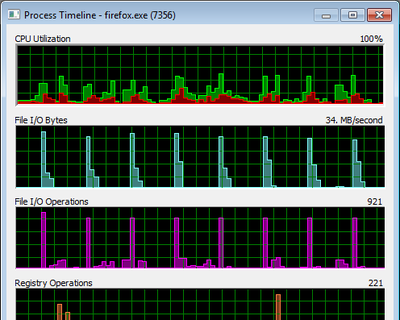
Problem Firefox (3.6.13) intermittently freezes. This happens during scrolling, text input, basically everywhere in the user interface, rendering the browser nearly useless. Analysis While browsing amazon.de I created a log of Firefox’s activities by recording system activity for 85 seconds with Sysinternals Process Monitor. I then filtered the log to include only Firefox activities. Clicking on Tools -> Process Activity Summary I got:
Performance/Sizing

Q&A: How to Modify Permissions on Administrative Shares

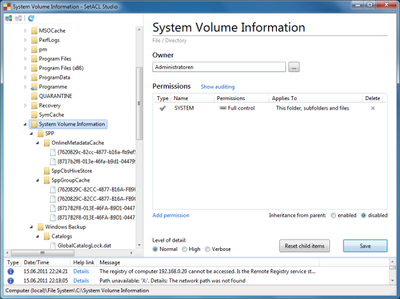
Question by reader Kendra: I stumbled upon your blog/profile while I was looking for options to lockdown my administrative shares. Maybe you can help me. I’m a Network Administrator for an aerospace / engineering firm where users need administrative access to their PCs. The engineers work on very high-level OS and hardware development and need complete control of their systems. As you can imagine this poses a huge security problems for me at the network level. Currently my users are granted local administrator rights via an AD group (Local Admins) which is added to the local Administrators group on their local PCs. This makes it convenient for my engineers to login to any PC in the company and have local admin rights to do whatever they need to do. This also gives all of my users access to each other’s administrative shares across the network. For example, anyone in this AD group can run \computername\c$ and access any PC on my domain. I do NOT want to disable administrative shares as I am using them to automatically deploy desktop configuration settings (email, mapped network drives, printers, etc). Do you know of a way that I can give my engineers local admin rights without giving them rights to each other’s administrative shares? Any help would be greatly appreciated.
Windows Internals

How to Get Back Windows XP's Fast Event Viewer in Windows 7

How to Get Back Windows XP's Fast Event Viewer in Windows 7
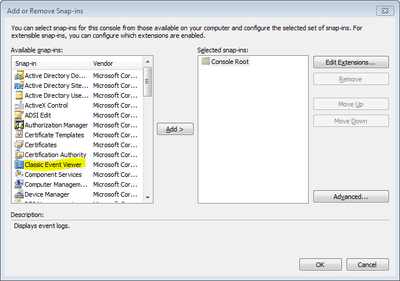
One of the first things I noticed about Windows Vista and immediately disliked was the new event viewer. The user interface is too cluttered, but more importantly, it is just so very sloooow. It is so slow that I think twice before starting it. And when I do, I almost feel physical pain watching it initialize. Unfortunately, Windows 7 brought no improvements in this area. Just when I thought I was doomed to use this fattened-up Garfield version of an event viewer for years to come, Twitter buddy Kimmo Jernstrom described how to get back the good old “classic” event viewer on modern versions of Windows.
Windows General

The Making of HelgeKlein.com, SetACL's New Home

The Making of HelgeKlein.com, SetACL's New Home
Until yesterday, SetACL’s web presence consisted of six static HTML pages. That was great for speed, but it sucked in almost every other aspect. And the design … better not speak about that. The old website was hosted on Sourceforge, on the subdomain setacl.sourceforge.net, to be exact. High time for a radical change. I wanted a good clean design, interactivity (commenting), easy maintenance and my own domain. And I wanted a place where I could assemble and store all the relevant content I publish on the web, namely blog articles and tweets. This is the story of the creation of that place.
Website

Can I Use the Same User Profile on 32-bit and 64-bit Windows?

This article is part of Helge’s Profile Toolkit, a set of posts explaining the knowledge and tools required to tame Windows user profiles. More and more people are upgrading to a 64-bit version of Windows. Many of them would probably like to keep their existing configuration. The question is: can you use the 32-bit profile on Windows x64? Is there even such a thing as a 32-bit or a 64-bit user profile? Or are profiles independent of the system’s bitness?
User Profiles

How the App Paths Registry Key Makes Windows Both Faster and Safer

How the App Paths Registry Key Makes Windows Both Faster and Safer
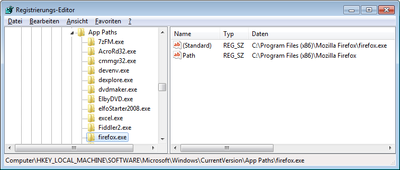
Why can you start Mozilla Firefox by typing “firefox” in the Run dialog and press enter? Firefox.exe is not located in any directory in the path. The same with Outlook (type “outlook”), PowerShell (“powershell”), VMware Workstation (“vmware”) or Adobe Reader (“acrord32”). This “magic application starting thingy” works because of a little-known Windows feature based on the “App Paths” registry key.
Windows Internals

Free Script: User Profile Domain Migration with SetACL

This article is part of Helge’s Profile Toolkit, a set of posts explaining the knowledge and tools required to tame Windows user profiles. When administrators migrate user accounts between domains, they typically re-ACL those server resources users have access to. In plain English: they copy or move the permissions from the accounts of the old domain to the corresponding accounts of the new domain. There are various ways to do that. In this article, I present a simple way to re-ACL roaming user profiles.
User Profiles

Taking Ownership Fails With UNC Path, Works Locally!?! Why?

Here is an interesting tidbit related to Windows security: Create a test file share, e.g. C:\temp\test, and share it with full permissions for everyone (share, not NTFS permissions) as “test” Create the following directory hierarchy below the share: C:\temp\test\1\2\3\4 Assign ownership of the four folders 1, 2, 3 and 4 to any user (but do not use your own account, just anyone else’s) Set permissions on 1, 2, 3 and 4 that only the user from the previous step has full access, nobody else, not even the SYSTEM Now try to use SetACL to change the owner of directory “4” over the network (SetACL uses backup and restore privileges so this should be no problem) by issuing the following command locally: setacl -on \localhost\test\1\2\3\4 -ot file -actn setowner -ownr n:domain\administrator SetACL will fail with access denied (full message: “ERROR: Writing SD to <\?\UNC\localhost\test\1\2\3\4> failed with: Access is denied.”) Now issue the same command, but instead of using a UNC path use the local drive letter: setacl -on c:\temp\test\1\2\3\4 -ot file -actn setowner -ownr n:domain\administrator That works! Why is this so? I have no clue.
Security

How to Modify Default Share Permissions and Other Tweaks

NTFS permissions are stored in the file system, that is well known. But where are share permissions stored? As so often with Windows: in the registry. Network shares are defined by only a handful of relatively simple registry entries stored in the server service’s key which is, for historical reasons that go back way beyond OS/2, named “LanmanServer” (the workstation service is similarly named “LanmanWorkstation”).
Windows Internals

Registry Tricks

Registry Tricks
Here are some pretty cool ways to work with the Windows registry. Regedit Multiple Instances Start multiple instances of Regedit by appending the command-line parameter -m, e.g.: regedit -m. Multiple instances of RegeditExporting/Importing Favorites Regedit’s favorites are a handy way to get to keys you often need. The list of favorites is stored in the registry (where else?): HKCU\Software\Microsoft\Windows\CurrentVersion\Applets\Regedit\Favorites. Exporting the favorites to a .REG file can easily be automated with reg.exe (see below).
Tips and Tools

Migrating from Blogger to Custom Domain on Wordpress Without Losing PageRank

Migrating from Blogger to Custom Domain on Wordpress Without Losing PageRank
Migrating a blog can be a very painful process, part of which stems from the fact that, if not done correctly, search engine valuation (aka PageRank) that took years to gain may be lost in days. Redirecting from the old blog to the new URL alleviates this problem at least, but not the way it is described on countless websites that recommend implementing JavaScript redirects search engines do not care about. Instead HTTP 301 redirects are needed which unfortunately required access to the .htaccess file on the web server hosting the old blog to set up. And you may have guessed already - Blogger.com does not grant that type of access.
Website

New OS = New Profile = User State Lost. True or False?

New OS = New Profile = User State Lost. True or False?
Going to Windows 7 or Server 2008 (R2) means trouble. Let me use an analogy to explain why. You are in charge of moving people from their old houses to shiny new buildings. You have planned everything perfectly. The new homes are beautiful and located in a great neighborhood. But still, after moving house, people start to complain. They do not feel at home. You forgot to take all those seemingly unimportant things that make a house a home: pictures, plants, all sorts of personal stuff. Impossible, you say? People would never leave their personal belongings behind? I agree: when it comes to moving house, not taking at least most of the personal stuff is highly unlikely. But in IT it is common practice.
User Profiles