The Unmanageable File Server

I had an interesting little case to solve at home recently when my headless file server suddenly would not accept RDP connections any more. It still worked flawlessly as a file server, so I ignored the problem for a while.

The issue became urgent when I wanted to run the backup program installed on the machine (which I do manually every month or so). With the machine being headless after the monitor had broken down my only connection to its desktop was via RDP. But mstsc.exe refused to connect…

I tried various simple troubleshooting steps, like connecting event viewer remotely or directing the services MMC to the other machine, but neither worked. Funnily enough, the computer was reachable via SMB all the time. Very strange.

Finally, devoid of other options, I persuaded my wife to borrow me her LCD TV and connected that to the computer. As soon as I logged on, I saw this:
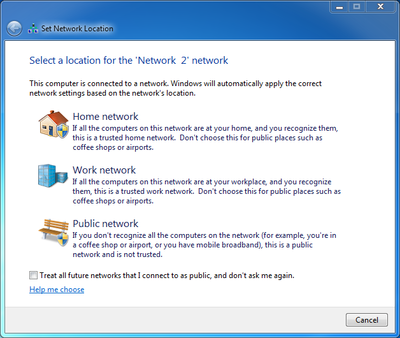
Windows 7 - choose a network location

After I clicked on “Home network” the problems were gone and the file server was reachable again. What a simple yet effective remedy!

What had caused this? I remembered that I had replaced the router/switch the server was connected to. Such a change is interpreted as a network location change by the OS, and modern versions of Windows ask politely if the current network is secure (home/work) or not (public). Until that question is answered, the firewall blocks (nearly) all connections…

Comments

Related Posts

Samba & SMB Web Access Through Filestash With Passthrough Auth

Samba & SMB Web Access Through Filestash With Passthrough Auth
This article explains how to set up Filestash in a Docker container as a web interface for browser-based access to a Samba or SMB file server. This newer configuration improves on my earlier Filebrowser setup in one essential point: the SMB storage is accessed as the authenticating user, i.e., the user authentication is passed through to the backend storage. This means that each user sees exactly the directories and files they have access to. When a new file is created through Filestash, it’s stored with the proper permissions as if it had been created it via SMB.
Home Automation, Networking & Self-Hosting

Simple OPNsense Firewall Rules for a Secure Smart Home

Simple OPNsense Firewall Rules for a Secure Smart Home
This article presents a simple, balanced OPNsense firewall configuration for a secure smart home. The config provides good security while still allowing the freedom that is required by a family that is comprised mostly of people who wouldn’t call themselves IT geeks. This post is part of my series on home automation, networking & self-hosting that shows how to install, configure, and run a home server & network with dockerized or virtualized services.
Home Automation, Networking & Self-Hosting

Latest Posts

Scripted WordPress to Hugo Migration

Scripted WordPress to Hugo Migration
After having published in WordPress for almost 20 years, it was time for a change. This site is now rendered by Hugo, a static website generator built for Markdown content hosted in a Git repository. The migration from WordPress (HTML) to Hugo (Markdown) was far from trivial. Since I couldn’t find any tool for the job, I developed my own set of migration scripts that fully automate the migration process. You can find them on GitHub along with extensive documentation.
Website