Monitor Boot Performance and Find the Cause for Delays with uberAgent for Splunk
- Performance/Sizing, UberAgent
- Published Jun 26, 2013 Updated Feb 23, 2021
Today it is still as common as it was in the 90s to go for a coffee after switching on the PC in the morning, only to find it still booting when coming back several minutes later. SSDs have not arrived in the average office yet, and even they can only cure some of the diseases that cause computers to start up agonizingly slowly.
Boot performance is to a PC what logon performance is to a terminal server.
One big difference from the 90s is that today many organizations start to realize the adverse effects of bad startup performance on employee productivity. Once they do so they need to find out where they stand. That is easy for a single boot process on a single PC - just time it with a stopwatch - but enterprises need more. They must be able to answer questions like the following:
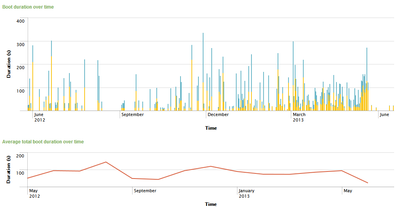
- What is the average boot duration over all PCs?
- Is it getting better or worse over time?
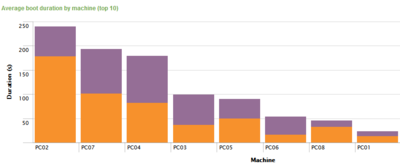
- Which PCs have the worst boot duration?
uberAgent for Splunk answers all these questions. It gives you trends:
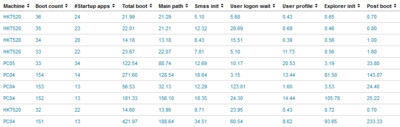
…as much detail as you want:
…and shows you which PCs really need attention:
Finding the Root Cause
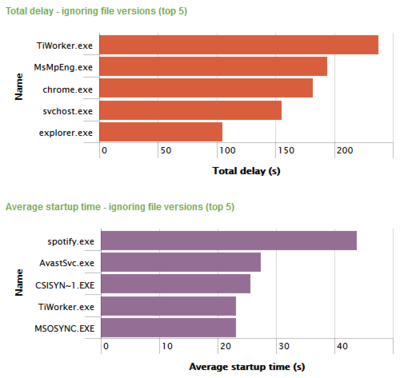
But that is not all: uberAgent also gives you likely causes for bad startup performance. Whether it is an application, a service or a driver, uberAgent shows you which component affects boot performance most:
Standby, Resume and Shutdown
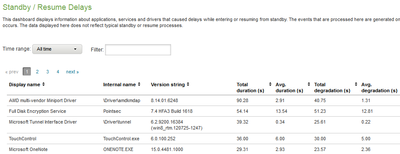
Problems with standby/resume and shutdown are just as common as boot issues and only marginally less effective in frustrating your users. Luckily uberAgent is just as effective in troubleshooting those kinds of on/off transitions as it is with system boot:
Available Now
But the best thing is: all this goodness is available now! Try it yourself!






Comments