Monitoring Browser Performance per Site with uberAgent for Splunk
- Logs & Metrics, Performance/Sizing, UberAgent
- Published May 7, 2013 Updated Feb 23, 2021
The days are long gone when a browser was just another application. Modern websites are applications of their own, and the browser is their operating system. That has consequences for monitoring. It is no longer sufficient to gather performance data for the browser as a whole. When, for example, Internet Explorer’s CPU usage is high, Administrators need to understand what caused that. Is it the business-critical ERP site or are people just watching fun videos on YouTube?
From Application to OS
Browsers started as simple programs, capable of displaying text and the odd image. Back in those days, the browser was an application that displayed static pages with no logic of their own. That changed dramatically with Ajax and Web 2.0. Boring HTML documents were pimped with JavaScript and the web slowly morphed from a collection of pages to a collection of applications.
All these millions of applications run on a single operating system - the browser. It had to evolve a lot to keep pace with the web’s rapid progress. Its JavaScript interpreter was soon complemented with a just-in-time compiler, it learned to run games smoothly and today even plays HD video without implants (plugins).
Browsers have become operating systems of their own. Some even have their own task manager.
Monitoring the Websites’ OS
When monitoring an operating system you want more than just one metric for the operating system as a whole. You want to know the resource usage of each application individually.
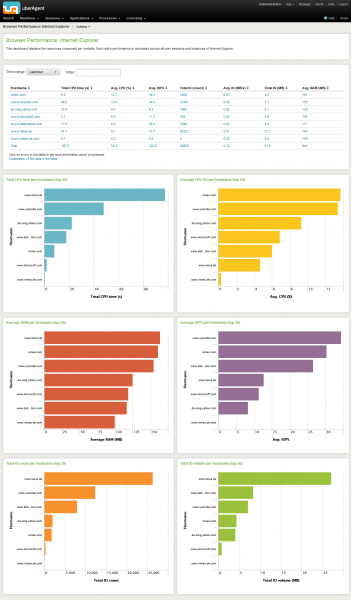
If websites are applications you need a way to monitor the performance characteristics of each site - how many IOPS it generates, how much RAM it uses, how it loads the CPU. Now you can.
uberAgent 1.0, available now, gives you detailed performance data for every website and any time period:

And it helps identify the bad guys that eat up the CPU cycles and steal the RAM:




Comments