
How to Speed Up Your Windows 7 Boot Time by 20%
[What I wrote here is wrong. Please read this follow-up article.]
Here is a very simple way to reduce the time it takes to boot Windows 7 by around 20% (the exact number depends on the hardware).
I would never have thought the effect to be this drastic, but the simple graphical animation Windows 7 displays while booting to the logon screen slows down the startup process by several seconds! By disabling this effect we gain roughly 20% in boot speed. There are two ways to configure this.
Using a GUI
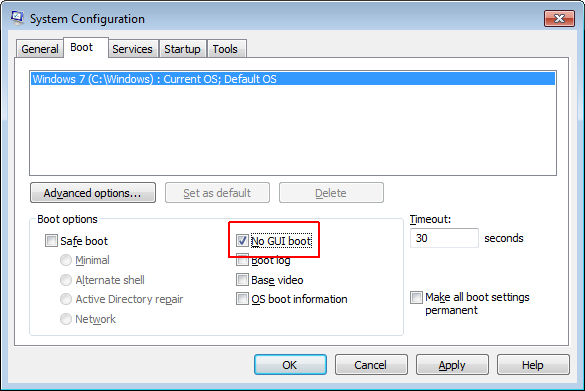
Run MSConfig.exe and check the box in front of “No GUI boot”:
From the Command Line
Issue the following command in an elevated command prompt:
bcdedit /set quietboot on
Caveats
I am not aware of any downsides of disabling the boot animation, except that the screen stays black while booting.
If you use BitLocker, make sure to suspend it prior to changing boot settings. You can resume it after the reboot. If you forget this, you will be prompted to enter your BitLocker recovery key each time the system starts up.
This setting has no effect on Windows Server 2008 R2, by the way.





13 Comments
This will probably have a nice effect on VDI environments too!
We also did some testing on how to speed up the boot time and found even if you only switch to the basic boot animation which also is used in Windows Server 2008 R2 you shorten your boot time by about 6 seconds. In our test we also found that there is no measurable time difference between the disabled and basic boot animation.
To switch to the basic boot animation: bcdedit /set bootux basic
To disable the boot animation: bcdedit /set bootux disabled
The basic boot animation is a bit more handy as you still see some progress.
Thanks for sharing, Tim!
sorry, but this is hoax.It speeds up nothing. xbootmgr confirms this. So if Windwos boot slowly analyze it with xbootmgr from the Windows Performance toolkit.
No, it is not. I did not bother with tools that measure from the inside, but took my measurements from the outside, with a simple stopwatch. And that shows that boot time is reduced.
What you see was the effect of ReadyBoot (not boost!). This is the boot prefetcher from Vista/7. Windows learns from older boots and now you see an improvement and think it is caused by your “tweak”.
Thank you! I re-tested and, obviously, you are right. It would have been too simple… I wrote a follow-up article explaining my mistake here: https://helgeklein.com/blog/2012/02/what-remains-of-magic-speed-improvements/
My system already boots from cold to Windows 7 64-bit desktop, ready to work, in 5 seconds.
Please DO NOT recommend setting the NOGUI boot option. If average users do this then schedule a disk check at start up they can EASILY be fooled into thinking their computer has frozen, without the GUI to tell them what’s going on.
This is from experience… several hours wasted yesterday, even took the hard drive out of my laptop and was about to try even more drastic steps to “fix” my unbroken machine:
http://paul.us2uk.eu/?x=entry:entry130702-165607
Don’t do it folks!
LOL, as you should have noticed I was wrong and the option “no GUI boot” does not improve boot times at all.
Thank you Helge, for being willing to admit the correction on this. It speaks volumes about your character and willingness to pursue factual guidance.
aw. shame, this was just what i was looking for!
oh well, thanks for the honesty..
I wondered about the animation when my recent SSD upgrade wasn’t much faster than my 10krpm drive and noticed it wouldn’t go to desktop until it finished the animation!
Experiment:
I did this experiment on two recently loaded machines with all updates done and adjusted for best performance in the advanced system settings.
One with crucial MX100 256GB another with VelociRaptor 300GB. Both with GA-970 mobo’s the VelociRaptor has a FX4100 with 1600MHz 8GB ram, the SSD has Athlon II X2 260 with 1333MHz 4GB ram.
From the point that the BIOS has displayed “Loading operating system…” to when desktop appears:
Without this modification the SSD takes 12seconds, the VelociRaptor takes 13 seconds.
With this modification the SSD takes 8 seconds the VelociRaptor takes 13seconds.
The animation takes 12 seconds to complete the windows logo, after which it will do the luminous throbbing if the system is still loading, I timed this animation on my laptop and a Sempron powered spare both also 12 seconds to complete the windows logo animation before the throbbing effect begins.
In essence, only if your machine can boot faster then 12 seconds then this animation is slowing you down, it will complete the windows logo before going to desktop even if the system is already fully loaded, otherwise disabling it will not change anything.