Recursively Setting Directory Attributes in PowerShell
- Scripting
- Published May 21, 2015
As I found out the (excellent) Egnyte Desktop Sync client for Windows ignores directories that have the system attribute set. For some reason some of the directories I wanted to sync did have this attribute set. Getting rid of the system attribute on (many) directories is harder than it seems.
Explorer
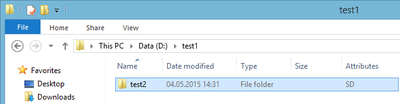
While you can get Explorer to display a directory’s attributes…
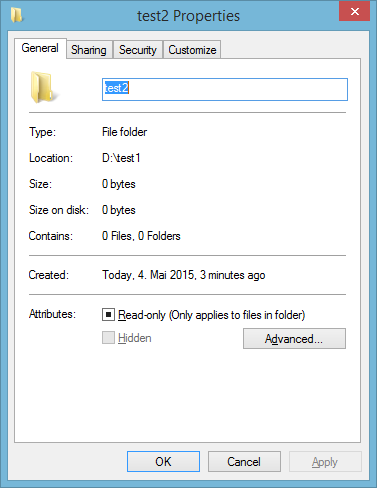
…it does not let you change all of them. Specifically not the system attribute:
Command Line
The good old attrib command lets you remove the system attribute, of course. It even has an option to work recursively. Unfortunately this applies to files only, not directories:
attrib -s /d /s d:\test1
PowerShell
PowerShell to the rescue! The following command removes the system attribute recursively from all directories, starting at D:\test1:
Get-ChildItem D:\test1 -Recurse -Force -ErrorAction SilentlyContinue | Where-Object {$_.PSIsContainer -and $_.Attributes -match "System"} | foreach {$_.Attributes = ""}
If you only want to list directories with the system attribute use this instead:
Get-ChildItem d:\test1 -Recurse -Force -ErrorAction SilentlyContinue | Where-Object {$_.PSIsContainer -and $_.Attributes -match "System"} | Select-Object FullName






Comments