Modern Multi-Process Browser Architecture
- Applications
- Published Jan 22, 2019 Updated Sep 9, 2020
An architecture overview of current browsers on Windows: Chrome, Firefox and Internet Explorer.
In case you are wondering: I did not include Edge because it is currently being transitioned to the Chromium rendering engine, which might change a few things. I did include Internet Explorer because it is still the default browser in many enterprises.
Looking for a way to monitor web app performance? Take a look at uberAgent, our user experience & application performance monitoring product.
Chrome Architecture
Chrome was the first browser with a multi-process architecture. Put simply, it encapsulates all logical functions in separate processes. More specifically:
- One main (browser) process
- One GPU process
- Each tab: dedicated process
- Each extension: dedicated process
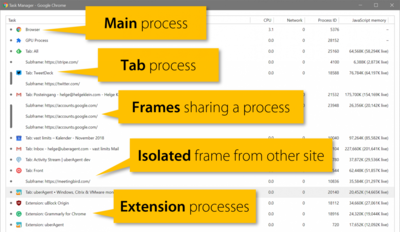
Chrome is the only browser with a useful task manager. It can be opened with the keyboard shortcut SHIFT+ESC. As you can see below, Task Manager lists all active Chrome processes with their designated functions. For each process, it shows CPU, network and memory resource usage. It also indicates whether frames are hosted in their page’s process or in dedicated processes (more on that below). Finally, Task Manager shows the Windows OS process ID, which makes it possible to correlate data with other system information tools.
Frames and Site Isolation
Frames share a process with their page if the frame and the page are from the same site (based on the URL).
Starting with Chrome 67, frames from different sites are put into different processes. This is called site isolation and aims to mitigate certain types of attacks. Chrome’s Process Internals page (chrome://process-internals/) lists the current status of each frame.
IE Architecture
IE’s multi-process architecture was introduced with IE8. It makes use of two types of processes:
- One main (frame) process
- Zero or multiple tab processes
Note the zero above. Depending on configuration, IE may be limited to just one process - in which case a bug in any component or add-on crashes all opened tabs. Keep in mind that IE add-ons are binary Win32 DLLs that are loaded into the tab process(es). A crash in an add-on also crashes the tab process(es) that host it. This is not the case with modern browsers (i.e., all other browsers), where extensions are basically web apps, built with JavaScript and HTML.
IE Tab Process Count
By default, the number of tab processes is auto-managed depending on the amount of RAM. This can be overridden by setting the TabProcGrowth registry value. It can either be a number (REG_DWORD) or a string (REG_SZ) - which is rather unusual.
A Microsoft blog post explains the TabProcGrowth value. It boils down to this:
| Value | Type | Description |
|---|---|---|
| 0 | REG_DWORD | single process for frame+tabs no matter what |
| 1 | REG_DWORD | single process for frame+tabs per bitness (important for 32-bit add-ons on 64-bit machines) |
| >1 | REG_DWORD | sets the maximum number of tab processes |
| small | REG_SZ | max. 5 tabs per session |
| medium | REG_SZ | max. 9 tabs per session |
| large | REG_SZ | max. 16 tabs per session |
Some notes and caveats:
- On remote desktop session hosts (RDSH) the default TabProcGrowth value is the number 1 (REG_DWORD)
- If TabProcGrowth is set to 0, 32-bit add-ons may not work on 64-bit Windows (Microsoft KB)
- TabProcGrowth configuration by Group Policy
Firefox Architecture
Historically, Firefox has been a single-process browser. As it turned out, running the browser UI plus the HTML rendering and JavaScript for all tabs in a single process is a bad idea. It easily freezes the UI, and it might not be optimal from a security point of view, either.
Mozilla started project Electrolysis as a gradual move to a multi-process architecture. This took 9 versions, from Firefox 48 to 56. The current architecture looks like this:
- One main process
- One GPU process
- One extension process
- Up to 4 content (tab) processes
The current default of 4 content processes might be changed in future versions. At this point, it can be increased to a maximum value of 7 content processes. Work is underway to encapsulate extensions in dedicate processes.
Summary
Browsers are evolving quickly - except for IE, of course. Microsoft is focusing on Edge. To be very clear: IE will not get any new features. It’s security updates only for the former world’s most popular browser who once had a market share of approximately 95% (in 2003).
It seems there is no way around the multi-process type of architecture. Benefits include increased stability and security. On the downside, we have an increased overhead.







Comments