Free and Powerful Equalizer for Windows 10
- Windows General
- Published Jan 29, 2019
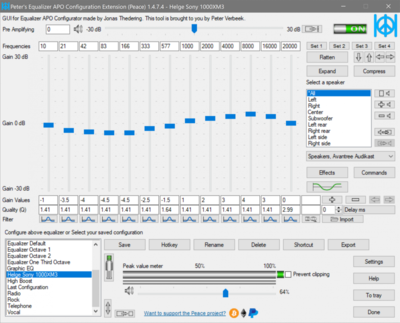
Windows 10 does not come with an equalizer. That can be annoying when you have headphones that are too heavy on the bass, like the Sony WH-1000XM3. Enter the free Equalizer APO with Peace, its UI.
What You Get
Peter’s Equalizer API Configuration Extension (Peace) is pretty easy to use while offering powerful features:
- Slider changes have an immediate effect
- Settings can be applied to invididual devices only
- Great flexibility
- Saved configurations
- Easy backup and restore of configurations
- Can be started at logon so that configured settings are always applied
The UI looks like this (showing my adjustments for the Sony WH-1000XM3):
Installation
Installation is straightforward. Just make sure to install in the following order
- Engine: Equalizer APO
- UI: Peace Equalizer
Enjoy!






Comments