Windows Update Error 80072EFE in Client Hyper-V Guest

Client Hyper-V was one of the things I was most looking forward to when I upgraded to Windows 8. I immediately added the Hyper-V feature and went to installing Server 2008 R2 in the first virtual machine. That went well enough and nothing extraordinary happened until I tried to run Windows Update in the new VM. Try as I might, Windows Update would always fail with the error code 80072EFE. Sometimes it chose to fail with 80072EE2, though.

As documented in a support article, those error codes stand for ERROR_INTERNET_CONNECTION_ABORTED and ERROR_INTERNET_TIMEOUT, respectively. Not too helpful. After searching around for some time I finally found an article that pointed me in the right direction.

As it turned out, Windows Update manages to disrupt the internet connection (not only of the guest, but also of the host):
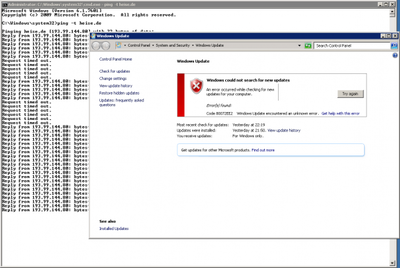
Windows Update Error in Client Hyper-V 01b

The reason for that nasty behavior seems to be a bug in the implementation of IP/TCP/UDP offload: after disabling these four settings on the synthetic guest NIC Windows Update worked like a charm:
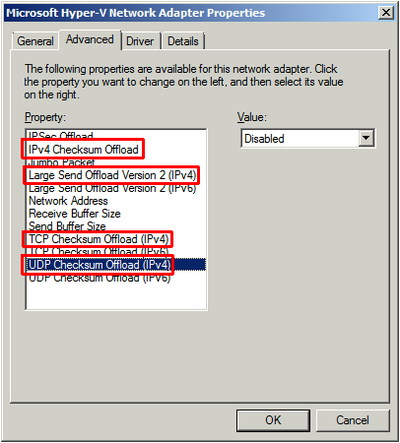
Windows Update Error in Client Hyper-V 02a

Comments

Related Posts

Windows Server 2019 on Hetzner's EX62 & AX100 Dedicated Servers

Windows Server 2019 on Hetzner's EX62 & AX100 Dedicated Servers
This post is a follow-up to my 2016 article on how to install Windows Server on Hetzner’s EX51 hosted dedicated servers. Hetzner offers many types of dedicated servers at very attractive prices and - astonishingly - good support. This article lists some issues we encountered while installing Windows Server 2019 on the EX62 and AX100 servers and how we worked around them. Reading the earlier article is highly recommended.
Virtualization & Containers

Latest Posts

Fast & Silent 5 Watt PC: Minimizing Idle Power Usage

Fast & Silent 5 Watt PC: Minimizing Idle Power Usage
This micro-series explains how to turn the Lenovo ThinkCentre M90t Gen 6 into a smart workstation that consumes only 5 Watts when idle but reaches top Cinebench scores while staying almost imperceptibly silent. In the first post, I showed how to silence the machine by replacing and adding to Lenovo’s CPU cooler. In this second post, I’m listing the exact configuration that achieves the lofty goal of combining minimal idle power consumption with top Cinebench scores.
Hardware

Fast & Silent 5 Watt PC: Lenovo ThinkCentre M90t Modding

Fast & Silent 5 Watt PC: Lenovo ThinkCentre M90t Modding
This micro-series explains how to turn the Lenovo ThinkCentre M90t Gen 6 into a smart workstation that consumes only 5 Watts when idle but reaches top Cinebench scores while staying almost imperceptibly silent. In this first post, I’m showing how to silence the machine by replacing and adding to Lenovo’s CPU cooler. In a second post, I’m listing the exact configuration that achieves the lofty goal of combining minimal idle power consumption with top Cinebench scores.
Hardware