Windows Update Error 80072EFE in Client Hyper-V Guest

Client Hyper-V was one of the things I was most looking forward to when I upgraded to Windows 8. I immediately added the Hyper-V feature and went to installing Server 2008 R2 in the first virtual machine. That went well enough and nothing extraordinary happened until I tried to run Windows Update in the new VM. Try as I might, Windows Update would always fail with the error code 80072EFE. Sometimes it chose to fail with 80072EE2, though.

As documented in a support article, those error codes stand for ERROR_INTERNET_CONNECTION_ABORTED and ERROR_INTERNET_TIMEOUT, respectively. Not too helpful. After searching around for some time I finally found an article that pointed me in the right direction.

As it turned out, Windows Update manages to disrupt the internet connection (not only of the guest, but also of the host):
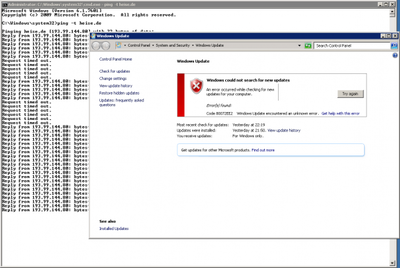
Windows Update Error in Client Hyper-V 01b

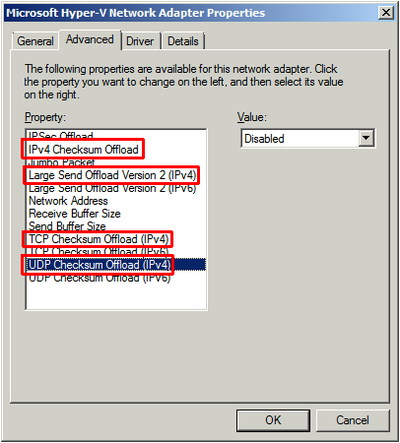
The reason for that nasty behavior seems to be a bug in the implementation of IP/TCP/UDP offload: after disabling these four settings on the synthetic guest NIC Windows Update worked like a charm:

Windows Update Error in Client Hyper-V 02a

Comments

Related Posts

Compacting Client Hyper-V VHDX Files

Compacting Client Hyper-V VHDX Files
Virtual hard disks have the same tendency to grow in size as regular disks have to fill up. Deduplication is a great way to battle this, but unfortunately it is not available for Windows 8 Client Hyper-V. I know that hacks are available describing how to transfer the relevant DLLs from Server 2012 but I value my data too much to try that. The only thing left in order to regain valuable (SSD) disk space is to compact the VHDX. That, however, is more difficult than it should be.
Virtualization & Containers

Streamed Video Audio Sync Problems on Windows 10 / Realtek Sound

Streamed Video Audio Sync Problems on Windows 10 / Realtek Sound
I have been watching streaming video for a very long time. It always worked beautifully, in high resolutions and from any site: YouTube, Netflix, Amazon Prime Video, you name it. Then suddenly I started to notice lip sync issues, probably around autumn/winter 2016. The longer a video played, the more the audio would get out of sync with the video, making watching and listening increasingly awkward. Recently I finally found the time to analyze these audio/video sync problems. Read on for a playback troubleshooting methodology followed by a workaround for the issue at hand.
Troubleshooting

Latest Posts