Zehnder ComfoAir & ComfoClime: Interfaces, APIs, Home Assistant Integrations
- Home Automation, Networking & Self-Hosting
- Published Jul 12, 2025
This is an attempt to bring some clarity into the various APIs, apps, interfaces, and Home Assistant integration options that are available for the Zehnder ComfoAir Q ventilation and ComfoClime cooling units.
The Zehnder ComfoAir Q device is a ventilation unit for one-family houses of various sizes. It can optionally be combined with a Zehnder ComfoClime cooling unit that cools the outside air on warmer days before distributing it to the rooms of your house.
If you have one or both types of Zehnder devices and wonder how to monitor or control them from Home Assistant, this post is for you.
Apps
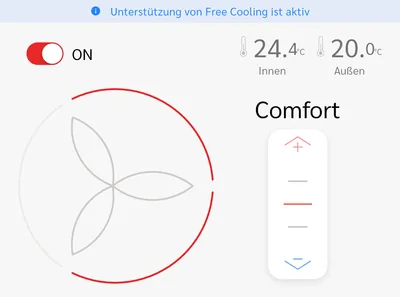
Confusingly, Zehnder provides two different apps: one for the base ventilation and the other for the optional cooling unit. As you can see below, neither app provides full control of both types of devices. If you have a ComfoAir Q paired with a ComfoClime device, you need both apps.
ComfoControl vs. ComfoClime
The ComfoControl app provides full control of the ComfoAir Q ventilation unit. However, it doesn’t control the ComfoClime cooling unit in any way. The ComfoClime app provides full control of the ComfoClime cooling unit. However, it only provides rudimentary control of the ComfoAir Q ventilation unit.
Interfaces
Interfaces connect the Zehnder devices to the world via KNX, Modbus, or REST APIs. See also Zehnder’s interface comparison matrix.
ComfoClime Arduino
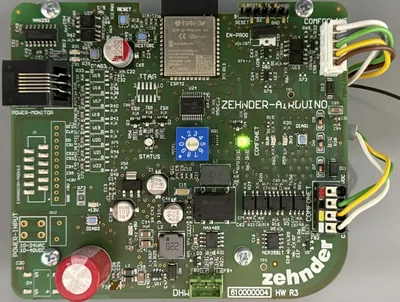
This is the Arduino board built into the ComfoClime unit. It’s connected to the ComfoAir Q unit via the ComfoNet bus.
- App: ComfoClime
- API: REST, not officially documented (unofficial project)
- Control of the ComfoClime unit: yes
- Control of the ComfoAir unit: limited
ComfoConnect Pro
The ComfoConnect Pro is an external Ethernet interface for ComfoAir Q units that is connected via the ComfoNet bus. It’s the successor of the ComfoConnect LAN C.
- App: ComfoControl
- API: Modbus
- Control of the ComfoClime unit: no
- Control of the ComfoAir unit: yes
ComfoConnect LAN C
The ComfoConnect LAN C is an external Ethernet interface for ComfoAir Q units that is connected via the ComfoNet bus. It’s the precursor to the ComfoConnect Pro and may not be sold anymore.
- App: ComfoControl
- API: not officially documented
- Control of the ComfoClime unit: no
- Control of the ComfoAir unit: yes
ComfoConnect KNX C
The ComfoConnect KNX C is an external KNX interface for ComfoAir Q units that is connected via the ComfoNet bus. It suffers from an inadequate implementation and floods the KNX bus with telegrams. It has never been updated. Stay away from this!
- App: none
- API: none
- Control of the ComfoClime unit: no
- Control of the ComfoAir unit: yes
Home Assistant Integrations
There are several Home Assistant integrations I’m aware of.
ComfoClime
This is the only Home Assistant integration for Zehnder ComfoClime units that I’ve seen. It’s still pretty young but shows a lot of promise. This ComfoClime integration is, of course, a custom integration via HACS. Install it via this GitHub project. It connects to the undocumented JSON API used by the ComfoClime app and supports both ComfoAir Q and ComfoClime devices.
ComfoConnect Legacy
This is the official Home Assistant integration. As my heading implies, it’s obsolete and probably shouldn’t be used in new projects anymore.
ComfoConnect Extended
This is the extended custom integration, available via HACS, that effectively supersedes the ComfoConnect Legacy integration mentioned above. It uses the aiocomfoconnect Python library to connect to ComfoAir Q devices. This also means that it doesn’t support ComfoClime units in any way.
Honorary Mentions and More Information
HA Visualizations
- Cool HA ventilation card.
ComfoClime API
Hardware Projects
ESPHome to Zehnder CAN Bus
- Vekexasia
- Yoziru
- Description of a user.






Comments