Shortcut Magic
- Windows General
- Published Sep 15, 2011 Updated Jul 14, 2019
Windows shortcuts aka LNK files have interesting capabilities. The shortcut target can be stored not only as a fixed-path string, but also as an item ID list. If a shortcut is equipped with such a list, it is - to a certain extent - platform-independent.
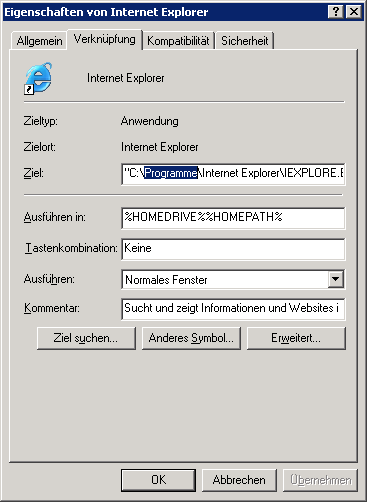
When the shortcut target is resolved, the current platform is taken into account and the resulting path is modified accordingly. Here is an example: Looking at the properties of the Internet Explorer shortcut in Start Menu on a German copy of Windows XP, you will notice that the target path points to something below “C:\Programme”:
When you look at the properties of the same shortcut from 64-bit Explorer on Windows 7 x64 you see something entirely different:
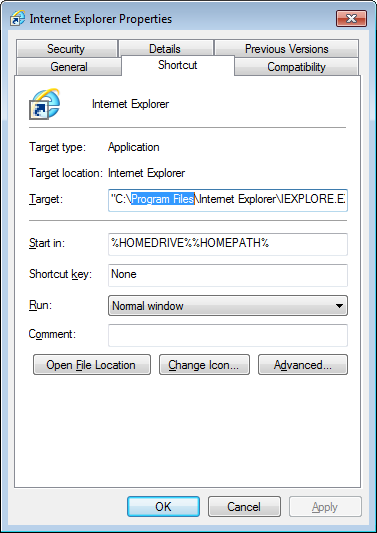
The target path was auto-corrected from “C:\Programme” to “C:\Program Files”. And this goes event further: when viewed from a 32-bit process on Windows 7 x64 even different properties are displayed:
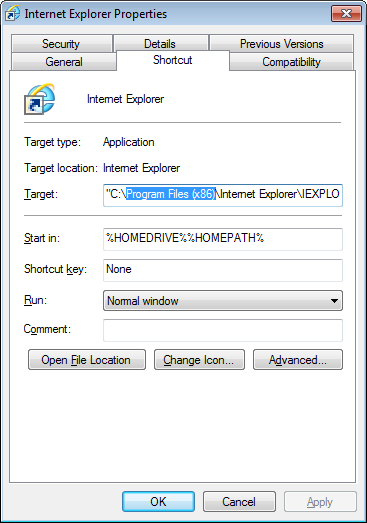
Now we have the 32-bit Program Files folder “C:\Program Files (x86)”.





Comments