The Perfect Workstation: Fujitsu Celsius J550

  • Hardware
  • Published Nov 23, 2016 Updated Mar 18, 2018

When it comes to selecting a general-purpose workstation I tend to be looking for the impossible: high performance, superb reliability, quiet operation, moderate price. Amazingly, there exists at least one device with all those qualities: the Fujitsu Celsius J550.
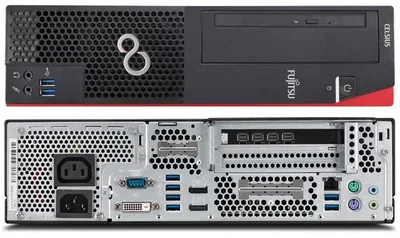
fujitsu-celsius-j550-front-and-back

The Perfect Workstation

The perfect workstation should be:

  • reliable
  • fast
  • silent
  • well-supported
  • energy-efficient
  • user-upgradeable
  • small

…and not cost an arm and a leg.

Fujitsu Celsius J550

The Fujitsu Celsius J550 combines these contrasting requirements perfectly. It is relatively small, but large enough to hold two 2.5" drives plus one M.2 SSD and the DVD drive it comes with (and which I could do without). It uses Intel processor graphics by default, but has room for a dedicated graphics card. In my opinion the fastest regular desktop CPU, the Intel Core i7-6700 is currently the best option, but Xeons are available, too. Four DIMM slots allow for up to 64 GB of RAM to be installed.

On-Site Support

A very important aspect of any professionally used computer is whether on-site support is available and at what cost. The Celsius J550 comes with three years of warranty which can be upgraded to on-site support with the purchase of a Support Pack for the amazingly low price of €38. To make it easier for anyone interested to located said Support Pack here is Fujitsu’s part number: GA3S20Z00DEWSJ.

Noise and Energy

When the Celsius J550 is below your desk you won’t hear it. I am quite picky with regards to environmental noise, but that is good enough even for me. I have not measured the energy intake, but Fujitsu prides itself in energy efficiency (they design their own mainboards to be able to maximize efficiency).

Price

The Celsius J550 is rather inexpensive given its qualities. Prices start at around €900. Unfortunately Fujitsu is a lot better at building machines than at selling them. Their online shop lists only select few configurations, but you may be able to find your desired model at an independent web shop.
Comments

Related Posts

Fast & Silent 5 Watt PC: Minimizing Idle Power Usage

Fast & Silent 5 Watt PC: Minimizing Idle Power Usage
This micro-series explains how to turn the Lenovo ThinkCentre M90t Gen 6 into a smart workstation that consumes only 5 Watts when idle but reaches top Cinebench scores while staying almost imperceptibly silent. In the first post, I showed how to silence the machine by replacing and adding to Lenovo’s CPU cooler. In this second post, I’m listing the exact configuration that achieves the lofty goal of combining minimal idle power consumption with top Cinebench scores.
Hardware

Lenovo Yoga 900: SSD Upgrade & Clean Windows Installation

Lenovo Yoga 900: SSD Upgrade & Clean Windows Installation
The Lenovo Yoga 900 packs some amazing hardware in an ultraportable 1.29 kg 13" chassis: high-resolution 3200x1800 screen, Intel Core i7-6500U CPU, 16 GB RAM. The only downsides I found so far: glossy display, maximum SSD size is 512 GB, OS is Windows Home, not Pro. There is not much we can do about the former, but we can change latter two pretty easily. This article explains how to upgrade the SSD and install a clean Windows 10 Pro without any Lenovo bloatware.
Hardware

Latest Posts

Fast & Silent 5 Watt PC: Minimizing Idle Power Usage

Fast & Silent 5 Watt PC: Minimizing Idle Power Usage
This micro-series explains how to turn the Lenovo ThinkCentre M90t Gen 6 into a smart workstation that consumes only 5 Watts when idle but reaches top Cinebench scores while staying almost imperceptibly silent. In the first post, I showed how to silence the machine by replacing and adding to Lenovo’s CPU cooler. In this second post, I’m listing the exact configuration that achieves the lofty goal of combining minimal idle power consumption with top Cinebench scores.
Hardware

Fast & Silent 5 Watt PC: Lenovo ThinkCentre M90t Modding

Fast & Silent 5 Watt PC: Lenovo ThinkCentre M90t Modding
This micro-series explains how to turn the Lenovo ThinkCentre M90t Gen 6 into a smart workstation that consumes only 5 Watts when idle but reaches top Cinebench scores while staying almost imperceptibly silent. In this first post, I’m showing how to silence the machine by replacing and adding to Lenovo’s CPU cooler. In a second post, I’m listing the exact configuration that achieves the lofty goal of combining minimal idle power consumption with top Cinebench scores.
Hardware