Which Software Installed That Driver - And When?
- Windows Internals
- Published Feb 17, 2010 Updated Oct 24, 2010
Installing a software that includes a driver may leave your system in an inconsistent state. If the install fails, parts may remain on the system. And if the remaining part is a driver, I get nervous - drivers are not the kind of stuff I want to have lingering around my system’s memory. Here is a way of identifying when a driver actually got installed.
In my case, I installed, or rather tried to install, the Citrix Access Gateway (CAG) Plugin 4.6.2, a VPN client, on Windows 7 x64. That failed - the installer reported a timeout after a couple of minutes of showing a progress bar. I aborted the install, which worked, but when I rebooted the machine, it hung on shutting down. Not good.
After a reset I examined the system: nothing related to the CAG client, but in the properties of my network card I found something suspicious called “Deterministic Network Enhancer”:
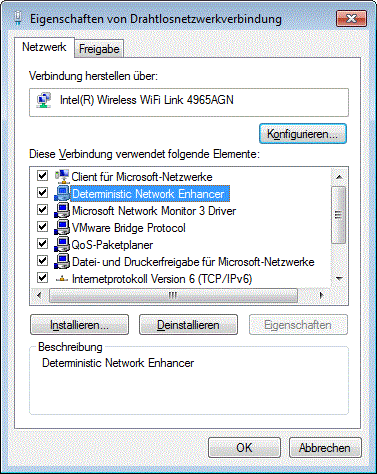
But how to know whether it came from the (partly failed) install or from something entirely else? First thought: Check the timestamp of the driver file. By searching the registry, I found the driver’s entries:
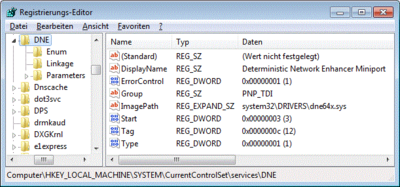
To my disappointment the driver file’s dates (dne64x.sys) revealed nothing. I did not install anything in 2008 - I run Windows 7…
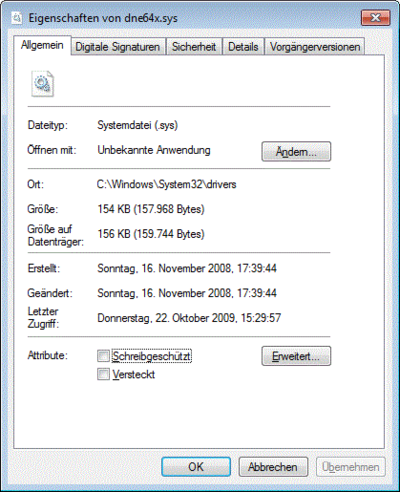
Then I had the idea of checking the registry. Each driver has a key under HKEY_LOCAL_MACHINE\SYSTEM\CurrentControlSet\services. And each registry key has a timestamp that gets updated whenever the key itself or a direct sub-object of the key get changed. So I only had to get the timestamp of the key HKEY_LOCAL_MACHINE\SYSTEM\CurrentControlSet\services\DNE in order to know when that driver had been installed.
But… although I run the seventh incarnation of Windows its registry editor has not changed much for at least a decade. Regedit.exe has many shortcomings, one of them being that it does not show timestamps for registry keys. Luckily, other programmers are more than happy to fill the void. I found the interesting tool Registry Commander - one of its capabilities is to show registry key timestamps. It looks like this:
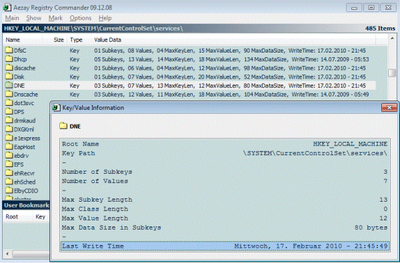
And that was the answer I sought. The DNE driver was indeed installed by the CAG client. Now I can safely disable or uninstall that driver.
What about you? Have you used any alternative registry editors? Do you prefer them over Regedit?





Comments