How the App Paths Registry Key Makes Windows Both Faster and Safer
- Windows Internals
- Published Aug 26, 2010 Updated Oct 24, 2013
Why can you start Mozilla Firefox by typing “firefox” in the Run dialog and press enter? Firefox.exe is not located in any directory in the path. The same with Outlook (type “outlook”), PowerShell (“powershell”), VMware Workstation (“vmware”) or Adobe Reader (“acrord32”). This “magic application starting thingy” works because of a little-known Windows feature based on the “App Paths” registry key.
App Paths - Dissection
In your forays through the Windows registry you may have noticed a peculiar key, HKEY_LOCAL_MACHINE\SOFTWARE\Microsoft\Windows\CurrentVersion\App Paths, that has subkeys named like executables. Here is what it looks like on my machine:
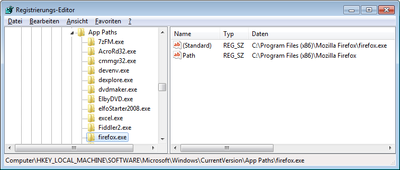
Notice that the HKLM App Paths key and its counterpart in HKCU are basically mapping tables between executable names and their full paths. The direct subkeys of App Paths store the executable names, while each subkey’s default value stores the full path to that executable.
Notice also, that the key “firefox.exe” has a named value “Path” that stores the path to the program’s installation directory.
So what is this all about?
App Paths - Explanation
The App Paths key provides a mechanism that allows programmers to make their application startable by name only without having to modify the system-wide path.
Why would they do that? Vanity and overestimation of the importance of one’s own application. But, hey, it sometimes does come in handy to be able to start programs without having to type the full path, just hit Win+R instead and type the executable name.
Getting more technical, modifying the system path is not exactly best practice since it may slow down the system, break other applications and even create security holes. To provide an alternative, Microsoft added the App Paths functionality in XP. Whenever a new process is to be started with the API functions ShellExecute or ShellExecuteEx, and only a file name without a path is specified, Windows looks in the following places for the executable:
- The current working directory.
- The Windows directory.
- The Windows\System32 directory.
- The directories listed in the PATH environment variable.
- If there is a App Paths subkey with the name of the executable, the key’s default value is used as the program’s full path. If the subkey also has a value named Path, the string stored in Path is added to the PATH environment variable, but only for the process to be started.
As mentioned, the App Paths key has a second use, namely proving per-process PATH configurations, reducing the need of application developers to modify the global system PATH.
For further information and a list of other possible values please see the MSDN article Application Registration.




Comments