New Articles, Tools, Tips and Tricks: Windows (7 and 2008 R2), PowerShell and Citrix
- Tips and Tools
- Published Feb 11, 2010 Updated Mar 4, 2019
Windows General
Good info for troubleshooting DFS-Namespaces in the MS KB: Storage locations, inconsistencies and how to deal with them.
Complex passwords and security guidelines for end users? No, thank you, says MS researcher. I agree.
Here is a hard-to-find list of MS KB article RSS feeds by product.
The free tool ADRecycleBin adds the missing GUI to the Active Directory recycle bin (which is PowerShell only, by default).
An extremely detailed article on Event Tracing for Windows in the NTDebugging blog.
José Barreto compiled a reference for DFS-N (Distributed File System - Namespaces). Lots of useful links there.
UPHClean is officially discontinued. My tip: the beta of 2.0 should NOT be used in production and does not run on Vista and upwards.
Windows System State Analyzer takes and compares snapshots of the entire machine. Great for checking on installers!
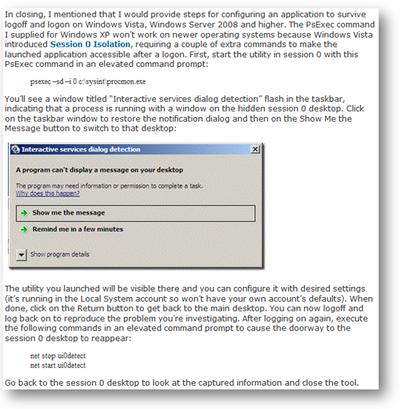
How to start any program under the SYSTEM account in session 0 on Vista/Win7 (psexec -sid does not work any more):
.NET apps are platform independent and you can run any .NET app on x64? Think again! Here is how to do it.
MS AskPerf blog on the nightmare of installing 64-bit printer drivers on a 32-bit server. It is way too complicated!
Domain controller stickiness, its problems and the fix introduced in Vista/2008 explained on MSDN (in Remarks)
A cool (albeit somewhat dangerous) way to copy an in-use Windows user profile employing shadow copies / hobocopy.
Windows 7 and Server 2008 R2
Comparison table of which features are available in which version of Windows 7.
Beta version of Windows Server Migration Tools for Server 2008 R2. Feedback welcome.
Here is a list of features that were removed in Win7/2008 R2 (e.g. NT4 domain join, Quick Launch Toolbar, …).
Looking for a list of all (44) features of Server 2008 R2? Here it is, well hidden in TechNet.
According to Microsoft’s Knowledge Base the only supported way of customizing the default user profile and creating a mandatory profile with Windows 7.
Changes in Functionality in Windows Server 2008 R2 - Microsoft white paper, 211 pages.
MS white paper: Remote Desktop Protocol Performance Improvements in Windows Server 2008 R2 and Windows 7.
PowerShell
PowerShell Configurator tool now in v1 RC: a more flexible replacement for sconfig. PowerShell Quick Reference (2 pages). Short, but nicely done.
Citrix
10 years of Citrix WebInterface, and it’s still not Web 2.0-ish or even user friendly. So Citrix starts all over again.
Detailed comparison of the architectures of Citrix Resource Manager and EdgeSight.
Good news for all who are using Citrix PVS with app streaming: future versions reduce expensive disk writes.
Citrix application streaming to support isolation/streaming of Windows services.
Citrix User Profile Manager can now stream profiles (transfer files only when used). That should reduce logon times nicely.
Optimizing Windows 7 for XenDesktop. A very good and detailed article by Citrix.
Note: This is mainly a condensed and beautified version of my twitter postings. You can get them unfiltered and without delay by following me.




Comments