Splunk Accelerated Data Models - Part 3
- Logs & Metrics
- Published Nov 5, 2015 Updated Apr 19, 2025
This article is based on my Splunk .conf 2015 session and is the second in a mini-series on Splunk data model acceleration. Make sure to read parts 1 and 2 first.
Searching Accelerated Data Models
Which Searches are Accelerated?
The high-performance analytics store (HPAS) is used only with Pivot (UI and the pivot command) and the tstats command. Regular searches and the datamodel command are not accelerated!
Tstats
The Principle
Tstats must be the first command in the search pipline. It is used in prestats mode and must be followed by either:
- Stats
- Chart
- Timechart
Learning Tstats
To learn how to use tstats for searching an accelerated data model build a sample search in Pivot Editor and inspect the underlying search:
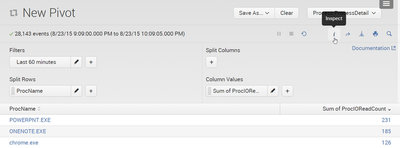
A new search job inspector window opens. The search can be found near the bottom. Copy it.
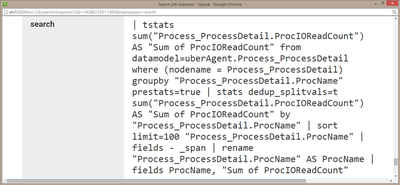
After a bit of cleaning up and removing unnecessary clutter the search looks like this:
| tstats
  sum("Process_ProcessDetail.ProcIOReadCount")
  from datamodel=uberAgent.Process_ProcessDetail
  where (nodename = Process_ProcessDetail)
  groupby "Process_ProcessDetail.ProcName"
  prestats=true
| stats dedup_splitvals=t
  sum("Process_ProcessDetail.ProcIOReadCount")
  as "Sum of ProcIOReadCount"
  by "Process_ProcessDetail.ProcName"
As you can see tstats is used in prestats mode (“prestats=true”) and is followed by a stats command that mirrors its precursor. The fact that two nearly identical search commands are required makes tstats based accelerated data model searches a bit clumsy. It does not help that the data model object name (“Process_ProcessDetail”) needs to be specified four times in the tstats command.
Pivot
The Principle
Pivot has a “different” syntax from other Splunk commands. Pivot only searches data models. As tstats it must be the first command in the search pipeline. Unlike tstats, pivot can perform realtime searches, too. This convinced us to use pivot for all uberAgent dashboards, not tstats. I have heard Splunk employees recommend tstats over pivot, but pivot really is the only choice if you need realtime searches (and who doesn’t?).
Learning Pivot
To learn how to use pivot for searching an accelerated data model build a sample search in Pivot Editor and open it in Search:
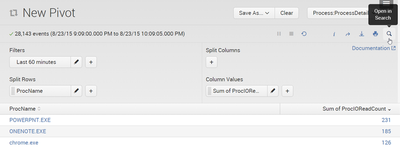
The underlying search can now easily be copied from Splunk’s search bar. After a bit of cleaning up and removing unnecessary clutter it looks like this:
| pivot uberAgent Process_ProcessDetail
  sum(ProcIOReadCount) as "Sum of ProcIOReadCount"
  splitrow ProcName as ProcName
This search is so much cleaner than its tstats cousin above!






Comments