Permissions Windows Does Not Show You
- SetACL Studio
- Published Jan 19, 2012 Updated Aug 30, 2012
Sometimes it is good not to know the truth, but as an administrator you better know what is going on! Most IT pros know that Explorer lies a lot (on a German system C:\Users magically becomes C:\Benutzer), but few are aware that Windows’ permission handling dialog ACL Editor also tends to “pretty up” things.
Example
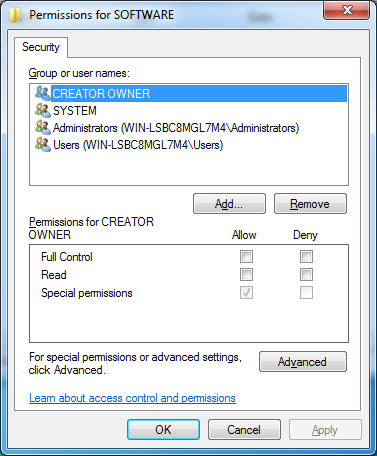
If we examine the permissions of the registry key HKLM\Software from within Regedit, the default view does not show anything out of the ordinary:
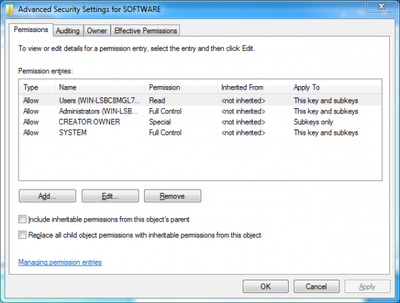
Neither does the advanced view:
But when examining the same key in SetACL Studio we see what is really stored in the ACL:
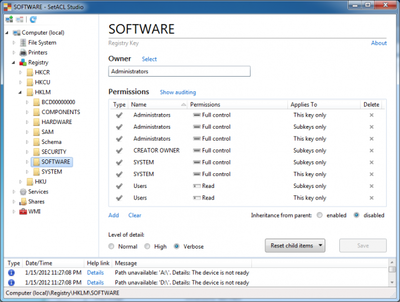
Wow! We suddenly see 8 entries instead of 4!
Many default permissions in Windows are configured rather inelegantly, and those set on HKLM\Software are not different. Not only does the Access Control List contain multiple ACE pairs that differ only by their inheritance settings and could be combined into one (e.g. Users and System), it also has one duplicate Access Control Entry (Administrators - full control - this key only). Similar default permissions are used in many places throughout the operating system, just check the ACL of drive C:, for example.
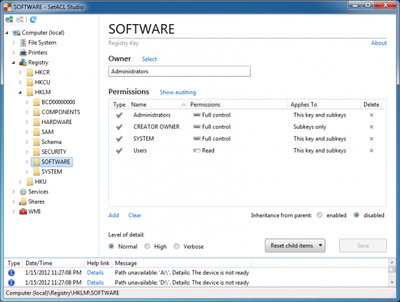
Windows ACL Editor lies to you whether you want it to or not. SetACL Studio shows you the unfiltered reality, but it can lie, too. It does that only if you want it to, though, prettying reality up a bit. For HKLM\Software the result looks like this:
About SetACL Studio
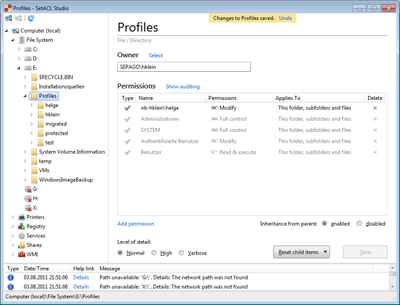
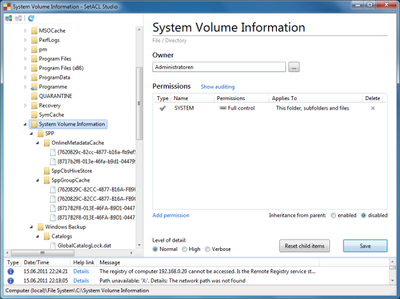
SetACL Studio combines an intuitive user interface with the power of SetACL into a permission management tool that works with the file system, the registry, printers, services, shares and WMI objects. It supports very long paths (the kind Explorer cannot handle) and shows you every corner of the system, regardless of current permissions.
Different from most systems management tools, SetACL Studio is extremely easy to use, has a great UI and comes with undo.





Comments