Error Connecting to C$: Device Attached to the System is not Functioning

When I tried to connect to the administrative file share C$ on my wife’s computer I got the error A device attached to the system is not functioning.
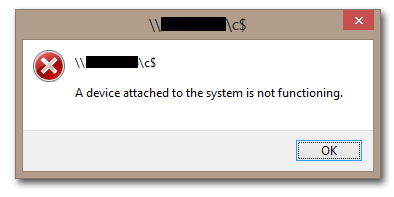
A device attached to the system is not functioning - 2

The other way round worked without a hitch, i.e. I could access my laptop’s C$ share from my wife’s computer.

When I tried to connect to her computer on the commandline I got this:

d:\>net use \\Computername\C$ /user:Computername\Username *
Type the password for \\Computername\C$:
System error 58 has occurred.

The specified server cannot perform the requested operation.

Different error message, same result.

After fruitlessly poking around some more I finally had the idea to check the target computer’s firewall settings. And indeed, file and printer sharing was disabled:
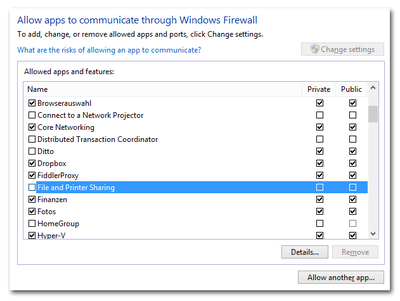
File and Printer Sharing disabled in Windows firewall

After enabling file and printer sharing for private networks and also disabling UAC remote restrictions (we are in a workgroup environment, not in a domain) things worked as expected.
Comments

Related Posts

Streamed Video Audio Sync Problems on Windows 10 / Realtek Sound

Streamed Video Audio Sync Problems on Windows 10 / Realtek Sound
I have been watching streaming video for a very long time. It always worked beautifully, in high resolutions and from any site: YouTube, Netflix, Amazon Prime Video, you name it. Then suddenly I started to notice lip sync issues, probably around autumn/winter 2016. The longer a video played, the more the audio would get out of sync with the video, making watching and listening increasingly awkward. Recently I finally found the time to analyze these audio/video sync problems. Read on for a playback troubleshooting methodology followed by a workaround for the issue at hand.
Troubleshooting

Remote Management of Windows PCs in an Isolated Security Zone

Remote Management of Windows PCs in an Isolated Security Zone
With the advent of BYO it has become fashionable to regard PCs as untrusted devices that should be isolated in a dedicated security zone. Zoning Such an approach has a big advantage: by separating clients from servers it is possible to treat them differently and potentially apply more relaxed security policies - which is a basic requirement for BYO. In a truly BYO-only environment you block everything except Citrix ICA or some other remoting procotol of choice at the firewall and life is good. In real corporate networks things are a bit more complicated, however. Say you want to isolate your managed Windows PCs. In that case you might want to be able to manage them remotely from systems outside the client security zone (e.g. from management terminal servers). And suddenly you have a problem: Windows management protocols, especially RPC and DCOM, are not exactly firewall-friendly.
Security

Latest Posts