Compacting Hyper-V VHDX Files of Ubuntu Linux VMs

Note: if your guest OS supports the trim command you can use the faster method described in this article.

If you configured your Hyper-V virtual machines with dynamically expanding virtual disks you will find that the VHDX files backing the virtual disks always grow in size, they never shrink. Eventually this becomes a problem either directly because of increased storage requirements or indirectly because backups take longer. Compacting VHDX files is possible but more complicated than I feel it should be. I have described the process for Windows VMs here. This article shows how to do it for Ubuntu Linux VMs.

Assessment

I am describing the process of reducing virtual hard disk size using our Ubuntu web server VM as an example. I distinctly remember that the VHDX size was approximately 24 GB when I installed the machine about 1.5 years ago. Let’s take a look at the current size:

PS C:\> dir 'D:\VMs\www1-ubuntu\Virtual Hard Disks'

    Directory: D:\VMs\www1-ubuntu\Virtual Hard Disks

Mode   LastWriteTime       Length         Name
----   -------------       ------         ----
-a---  29.11.2015 00:20    60704161792    www1-ubuntu.vhdx

Wow, that’s a whopping 60 GB! The VHDX’ size more than doubled! Let’s see what we can do about that.

Of course, you can get the same information from Hyper-V Manager’s GUI, too, by inspecting the virtual hard drive:
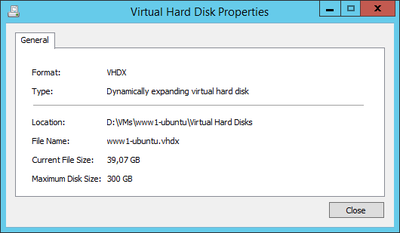
VHDX size in Hyper-V Manager

(Above screenshot was taken at a later time, thus the different size)

Preparation

The key to success is to zero all deleted blocks on the disk. For performance reasons the OS does not do that but simply marks those blocks as deleted, keeping the actual data as it is. But we can politely convince Linux to fill all deleted blocks with nulls using the following commands:

sudo apt-get install secure-delete

cd /

# This may take hours
sudo sfill -llz .

sudo shutdown -h now

Unfortunately the VM needs to be shut down for the size reduction. So no quick online no-downtime operation. Rather a lengthy service not available kind of thing.

Action

The actual size reduction of the VHDX file(s) is performed on the Windows host command line as follows:

PS C:\> gci -File -Filter *.vhd* -Path D:\VMs -Recurse | % {Mount-VHD $_.FullName -ReadOnly; Optimize-VHD $_.FullName -Mode full; Dismount-VHD $_.FullName}

The PowerShell command line above processes all VHDX files below a given base directory (D:\VMs), mounts each file read-only, compacts it and dismounts it.

Result

Let’s take a look at the result:

PS C:\> dir 'D:\VMs\www1-ubuntu\Virtual Hard Disks'

    Directory: D:\VMs\www1-ubuntu\Virtual Hard Disks

Mode   LastWriteTime       Length         Name
----   -------------       ------         ----
-a---  29.11.2015 13:25    24868028416    www1-ubuntu.vhdx

Not bad, from 60 GB down to 24 GB!
Comments

Related Posts

Compacting Client Hyper-V VHDX Files

Compacting Client Hyper-V VHDX Files
Virtual hard disks have the same tendency to grow in size as regular disks have to fill up. Deduplication is a great way to battle this, but unfortunately it is not available for Windows 8 Client Hyper-V. I know that hacks are available describing how to transfer the relevant DLLs from Server 2012 but I value my data too much to try that. The only thing left in order to regain valuable (SSD) disk space is to compact the VHDX. That, however, is more difficult than it should be.
Virtualization & Containers

Docker (Compose) Cheat Sheet

Docker (Compose) Cheat Sheet
This is a collection of tips and tricks I picked up while learning and working with Docker and Docker Compose on my home server and web server. Container Configuration Environment Variables Where to Define Environment Variables Environment variables are a common way to configure containers. To keep things organized, don’t put them in your Compose file but into dedicated files with the extension env. env_file vs. .env .env file: this “special” file can be used to set environment variable for use in the Compose file. The variables specified in .env are not available in the container. env_file: this section in the Docker Compose file lets you specify files that contain environment variables for use in the container. The variables specified in this section are not available in the Compose file. Bind Mounts vs. Docker Volumes Bind mounts let you control the directory structure. This has the advantage that you know exactly what gets stored where in the host’s file system. It has the disadvantage that you need to create the directory structure before you can start a container. Docker volumes are managed by the Docker engine. They’re stored in /var/lib/docker, “far away” from the Compose file. Personally, I very much prefer bind mounts because of the control they offer. I use subdirectories relative to the Compose file, e.g., ./data:/data. Keeping the container configuration and the container data in one place facilitates backups. Networking Expose vs. Ports Expose serves as documentation which ports a container is accessible on. Note: container ports are always accessible from other containers on the same Docker network. Ports makes container ports accessible to the host. Most of my services are accessible through the Caddy reverse proxy only. Opening ports to the host is, therefore, only rarely necessary. Static IP Address on the Host Network Use the Macvlan Docker network to attach a container directly to the host’s local network. Assign a static IP address by specifying the ip_range parameter in the ipam section of the Docker Compose file. See this configuration for an example. Disable Macvlan Container/Host Isolation Containers on a Macvlan network are isolated from the host. While the container can contact other machines on the local network, communications with the host are blocked. To work around that, create a virtual link with a route that points to the container’s IP address (example). Time Zone Containers should know about your local time zone. To achieve that, make it a habit to pass in /etc/localtime as a read-only volume to every container:
Virtualization & Containers

Latest Posts