Renaming Multiple Files With Regular Expressions in Total Commander
- Tips and Tools
- Published Mar 6, 2019
I prepend every document I save to disk with the year, month, and day. While I do that manually for individual files, sometimes I encounter larger numbers of files with an “incorrect” naming scheme. Here is how to quickly rename many files with the help of the versatile Total Commander.
Renaming Files With Regular Expressions
Sometimes you have sets of files with all the right components already in their names but in the wrong places. In one case, the year and month were at the end of the name, instead of the start. Additionally, I wanted to replace underscores with spaces (we are in the 21st century, after all).
Fixing that is surprisingly simple with Total Commander’s multi-rename tool. I defined a regex with two groups (sections in parentheses) to capture the year and month, respectively. The contents of the capture groups is placed in the variables $1 and $2 which I then used to build the new names.
Let me explain in more detail. This is the format of the existing files:
Bank_statement_01_2016.pdf
Bank_statement_01_2017.pdf
Bank_statement_02_2016.pdf
...
The desired target format:
2016-01 Bank statement.pdf
2016-02 Bank statement.pdf
2017-01 Bank statement.pdf
...
Search for the following regular expression, matching the source file names and capturing the month and year:
Bank_statement_(\d{2})_(\d{4})\.pdf
Replace with new filenames, making use of the regex capture group variables:
$2-$1 Bank statement.pdf
Using Total Commander Multi-Rename Tool
In Total Commander, select the files you want to rename, then press CTRL+M to bring up the multi-rename tool. Fill out the search and replace fields. As you can see below, Total Commander provides a preview of the changes. Once you are satisfied with the preview click “Start!” to perform the renaming.
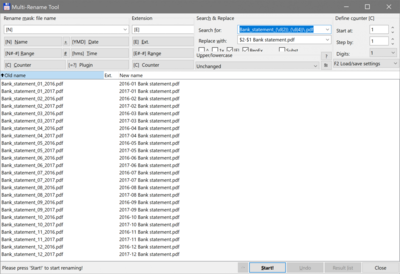
Side note: if you are on a high-resolution screen, you will notice that the line with the “RegEx” checkbox in the screenshot is only partly visible. That seems to be a rare DPI scaling bug in Total Commander. It most definitely is an exception: Total Commander is fully high-DPI aware.




Comments