Residual Glow in Vibia LED Lights When Switched Off via DALI
- Home Automation, Networking & Self-Hosting
- Published Jul 19, 2025
LED lights that still glow faintly when switched off seem to be a fairly common problem. This article describes possible solutions including the unlikely fix I found for our Vibia Duo ceiling lights.
The Problem
We have three Vibia Duo LED lights mounted on the ceiling in three different rooms. Each of these had the same issue: it glows faintly when switched off. You won’t notice the glow during the day but it’s clearly visible in the dark at night. Not great in a bedroom (guess where we’ve installed these lamps).
DALI
It may be relevant that our lights are controlled via DALI. In such a setup, the LED lights’ driver is always connected to 230 V power. The lights are switched on and off (and dimmed) through digital signals that are transmitted via two additional wires. Depending on these DALI control signals, the driver regulates the voltage on the LED’s DC circuit to dim or switch the lights.
Potential Causes and Fixes
Faulty Driver
I first suspected the driver, a TCI DC Maxi Jolly US DALI, so I searched for an alternative driver with the same specs from a different vendor, ordered and installed it, only to find that nothing had changed.
Resistor
Searching for a solution to “LED residual glow” turned up various recommendations to add a high-impedance resistor to the LED circuit. After ordering a set, I tried with a 10 kΩ 1W resistor: no change. When I tried a 100 Ω 1W resistor it quickly gave a burned smell (obviously, because I was routing too much power through it given the low resistance).
Snubber Capacitor
After some more research I found that residual glow in LED lights may be caused by leakage current. In such cases it helps to install a snubber capacitor. So I ordered a Lumonic X2Y2 capacitor following the advice in this article. To my great dismay, this didn’t fix the problem, either.
The Solution
When you have eliminated the impossible, whatever remains, however improbable, must be the truth.
Arthur Conan Doyle
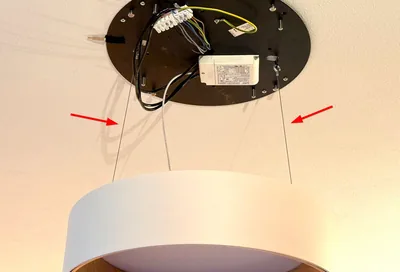
Almost at my wits’ end, I considered the two wires that hold the lamp approx. 30 cm below the ceiling when you’re working on the circuitry (see the image). They are made from metal and - theoretically - could be involved in somehow transporting a current to the LEDs. As it turned out, they are.
I first tried to insulate the wires by adding zip ties in between the wire and the ceiling mount. That did fix the issue, albeit only when the lamp was suspended from the ceiling, not when properly mounted on the ceiling.
So I went all in and replaced the offending wires with (non-conducting!) cord. That got rid of the residual glow in all three our Vibia Duo lamps simply and effectively.







Comments