Found my first bug in Windows 7 APIs: PdhBrowseCounters requires Elevation
- Software Development
- Published Oct 27, 2009 Updated Jun 1, 2011
I just found out the following, which does not seem to be documented anywhere:
The Windows API has a function for displaying a dialog that lets the user select a specific performance counter from all counters available on the local or a remote computer. The dialog is used by perfmon.exe, for example, and looks like this:
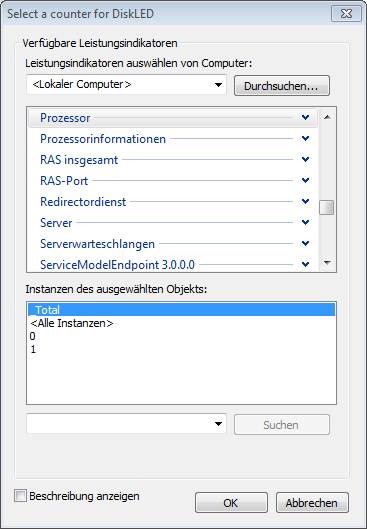
This dialog is instantiated by calling the API function PdhBrowseCounters. This works well enough - the dialog displays all objects, counters and instances, the user is able to select a specific counter and clicks on “OK”. The bad thing is that PdhBrowseCounters always returns an empty string instead of the counter path selected by the user. This happens if the application does not run elevated (i.e. with admin rights).
I have two problems with that:
- It is documented nowhere that elevation is required for PdhBrowseCounters.
- Why is elevation necessary? The user can see all objects, counters and their instances without elevation, so why not return the path selected?
For theses reasons I think this is a bug.
By the way, how does perfmon.exe work around this? It doesn’t. It requires elevation…
I have tested this on Windows 7 x64 German RTM with all patches till 10/27/2009.
And here is the code I used for testing (from my free tool DiskLED):
void CDialogConfig::OnBnClickedCounterpathSelect()
{
    PDH_STATUS                pdhStatus;
    PDH_BROWSE_DLG_CONFIG    oPDHBrowseDialogCfg;
    TCHAR                    sBuffer[PDH_MAX_COUNTER_PATH + 1];

    // Zero memory structures
    ZeroMemory (&oPDHBrowseDialogCfg, sizeof (PDH_BROWSE_DLG_CONFIG));

    // Initialize the path buffer
    ZeroMemory (&sBuffer, sizeof (sBuffer));
    //_tcscpy_s (sBuffer, PDH_MAX_COUNTER_PATH + 1, m_sCounterPath);

    // Initialize the browser dialog window settings
    oPDHBrowseDialogCfg.bIncludeInstanceIndex        = FALSE;
    oPDHBrowseDialogCfg.bSingleCounterPerAdd        = TRUE;
    oPDHBrowseDialogCfg.bSingleCounterPerDialog        = TRUE;
    oPDHBrowseDialogCfg.bLocalCountersOnly            = FALSE;
    oPDHBrowseDialogCfg.bWildCardInstances            = TRUE;
    oPDHBrowseDialogCfg.bHideDetailBox                = TRUE;
    oPDHBrowseDialogCfg.bInitializePath                = FALSE;
    oPDHBrowseDialogCfg.bDisableMachineSelection    = FALSE;
    oPDHBrowseDialogCfg.bIncludeCostlyObjects        = FALSE;
    oPDHBrowseDialogCfg.bShowObjectBrowser            = FALSE;
    oPDHBrowseDialogCfg.hWndOwner                    = m_hWnd;
    oPDHBrowseDialogCfg.szReturnPathBuffer            = sBuffer;
    oPDHBrowseDialogCfg.cchReturnPathLength            = sizeof (sBuffer) / sizeof (TCHAR);
    oPDHBrowseDialogCfg.pCallBack                    = NULL;
    oPDHBrowseDialogCfg.dwCallBackArg                = 0;
    oPDHBrowseDialogCfg.CallBackStatus                = ERROR_SUCCESS;
    oPDHBrowseDialogCfg.dwDefaultDetailLevel        = PERF_DETAIL_WIZARD;
    oPDHBrowseDialogCfg.szDialogBoxCaption            = TEXT ("Select a counter for DiskLED");

    // Display the counter browser window. The dialog is configured
    // to return a single selection from the counter list.
    pdhStatus    = PdhBrowseCounters (&oPDHBrowseDialogCfg);
    if (pdhStatus != ERROR_SUCCESS)
    {
        if (pdhStatus != PDH_DIALOG_CANCELLED)
        {
            m_pMainFrame->LogError (TEXT ("OnBnClickedCounterpathSelect"), TEXT ("PdhBrowseCounters"), pdhStatus);
        }
    }
    else
    {
        m_sCounterPath    = sBuffer;

        // Update the dialog with the new data
        UpdateData (FALSE);
    }
}




Comments