XenApp and RDS Sizing Part 4 – Calculating the New Farm's Capacity

This article is part of a mini-series. You can find the other articles here. In the previous articles in this series we saw how to calculate a farm’s capacity and then how to determine its load. With that information and knowledge of our methodology we can go about calculating the capacity of the new farm, in other words doing the actual sizing. Which is dead simple, by the way.
Citrix/Terminal Services/Remote Desktop Services
XenApp and RDS Sizing Part 2 - Determining Farm Capacity

XenApp and RDS Sizing Part 2 - Determining Farm Capacity
This article is part of a mini-series. You can find the other articles here. As we have seen in part 1 of this series, when sizing a new farm the first thing we need to know is the capacity of the existing farm. Armed with data on capacity and additionally load, we can easily calculate the capacity of a new farm. In this article I describe how to determine capacity of the four relevant hardware components of a XenApp server: CPU, memory, storage and network.
Citrix/Terminal Services/Remote Desktop Services
Fixing Office 2007's Quick Access Toolbars With Citrix User Profile Manager

Fixing Office 2007's Quick Access Toolbars With Citrix User Profile Manager
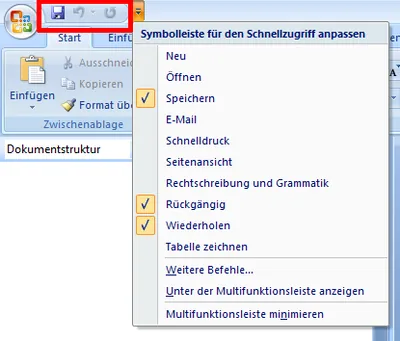
Not sure where user profile management might be useful? Here is an example that should apply to almost everyone. The obvious new user interface feature of Microsoft Office 2007 is the ribbon. But there are numerous other UI enhancements over Office 2003. One of these are the Quick Access Toolbars. If you are not sure what I am talking about: the following screen shot should give you an idea (from a German version of Office, sorry):
User Profiles

Citrix Products 2010: A Wish List

What would Joe, a Citrix admin, put on his Christmas wish list? Here are some guesses in no special order. XenApp A version of XenApp that runs on Windows Server 2008 R2 One console only, at least for XenApp PowerShell SDK for managing XenApp Realtime audio/video so that, for example, Microsoft Office Communication Server can be used well Migration tool that exports an old farm’s settings and imports them after optional transformation into a new farm Support for XenApp in SCCM (Microsoft System Center Configuration Manager)
Citrix/Terminal Services/Remote Desktop Services
Four Ways to Increase the Capacity of Your Citrix XenApp Farm

Even with the most meticulous design, the day will come when your farm’s capacity is not sufficient any more. User numbers increase, applications become more resource-hungry and the amount of data to be handled increases steadily. So what do you do? Simply more of the same, i.e. buy more servers and add them to the farm? That is one way of increasing capacity, but it is not the only one and therefore may not be the best.
Performance/Sizing