Finding (Executables in) User-Writeable Directories
Finding (Executables in) User-Writeable Directories
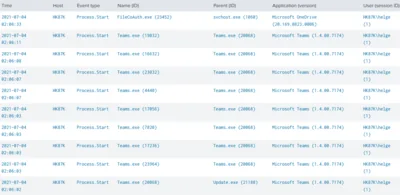
This article presents two different detection types for insecure filesystem permissions on Windows endpoints: scanning for directories that are user-writable, and detecting processes that are started from user-writeable directories. Directory Scan With ListUserWriteableDirectories & SetACL My ListUserWriteableDirectories script is an implementation of the first detection type: it scans the filesystem listing any permissions not known to be safe.
Security

Free Script: User Profile Domain Migration with SetACL

This article is part of Helge’s Profile Toolkit, a set of posts explaining the knowledge and tools required to tame Windows user profiles. When administrators migrate user accounts between domains, they typically re-ACL those server resources users have access to. In plain English: they copy or move the permissions from the accounts of the old domain to the corresponding accounts of the new domain. There are various ways to do that. In this article, I present a simple way to re-ACL roaming user profiles.
User Profiles

Taking Ownership Fails With UNC Path, Works Locally!?! Why?

Here is an interesting tidbit related to Windows security: Create a test file share, e.g. C:\temp\test, and share it with full permissions for everyone (share, not NTFS permissions) as “test” Create the following directory hierarchy below the share: C:\temp\test\1\2\3\4 Assign ownership of the four folders 1, 2, 3 and 4 to any user (but do not use your own account, just anyone else’s) Set permissions on 1, 2, 3 and 4 that only the user from the previous step has full access, nobody else, not even the SYSTEM Now try to use SetACL to change the owner of directory “4” over the network (SetACL uses backup and restore privileges so this should be no problem) by issuing the following command locally: setacl -on \localhost\test\1\2\3\4 -ot file -actn setowner -ownr n:domain\administrator SetACL will fail with access denied (full message: “ERROR: Writing SD to <\?\UNC\localhost\test\1\2\3\4> failed with: Access is denied.”) Now issue the same command, but instead of using a UNC path use the local drive letter: setacl -on c:\temp\test\1\2\3\4 -ot file -actn setowner -ownr n:domain\administrator That works! Why is this so? I have no clue.
Security

Permissions: A Primer, or: DACL, SACL, Owner, SID and ACE Explained

Updated: 2021-06-22 Every object that can have a security descriptor (SD) is a securable object that may be protected by permissions. All named and several unnamed Windows objects are securable and can have SDs, although this is not widely known. There does not even exist a GUI for manipulating the SDs of many object types! Have you ever tried to kill a system process in Task Manager and got the message “Access denied”? This is due to the fact that this process’ SD does not allow even administrators to kill the process. But it is, of course, possible, as an administrator, to obtain the necessary permissions, provided a GUI or some other tool is available.
Windows Internals

How to Prevent Users from Changing Permissions on File Servers

On file servers in corporate environments one typically does not want users to change permissions, even on their own files. It might seem that it would be sufficient to simply grant change permissions instead of full control, but unfortunately that is not the case. The problem is that whenever a new file gets created, the user creating the file will be its owner. And owners can always change permissions, regardless of the contents of the DACL.
Tips and Tools