Top 10 IT Security Tips for Individual Users

Top 10 IT Security Tips for Individual Users
This is a list of simple things that will protect you from nearly all the real-world IT security issues affecting individuals and SOHO users. 1. Install All the Updates What Should You Do? Enable automatic updates wherever possible Don’t use obsolete software versions Why Is It Important? Older software versions often have known security issues for which exploits are readily available. This means that even script kiddies can easily attack large numbers of users.
Security
Azure DevOps: Restricting Credentials to a Single Repository

Azure DevOps: Restricting Credentials to a Single Repository
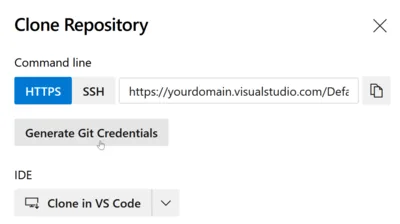
You may find yourself in a situation where you need to limit a set of credentials to a single Git repository only - like I did when I was working on a Git-based configuration backup solution for Linux. In such a case, you want the Git credentials you are storing per machine to grant access to that machine’s repository only. As useful as such a setup is from a security point of view, it is currently difficult to implement in Azure DevOps.
Software development

Blocking Office Macros, Managing Windows & macOS via Intune

Blocking Office Macros, Managing Windows & macOS via Intune
How to centrally manage essential security settings of self-managed devices This is a guest post by Martin Kretzschmar, customer success engineer at vast limits, the uberAgent company. One thing I especially like about my everyday working life is the flexibility it offers. I appreciate the freedom of choice in terms of location, time and device. We want to avoid getting into micro-management but, being an IT company, we also need to provide the necessary security where needed.
Scripting

Taking Ownership Fails With UNC Path, Works Locally!?! Why?

Here is an interesting tidbit related to Windows security: Create a test file share, e.g. C:\temp\test, and share it with full permissions for everyone (share, not NTFS permissions) as “test” Create the following directory hierarchy below the share: C:\temp\test\1\2\3\4 Assign ownership of the four folders 1, 2, 3 and 4 to any user (but do not use your own account, just anyone else’s) Set permissions on 1, 2, 3 and 4 that only the user from the previous step has full access, nobody else, not even the SYSTEM Now try to use SetACL to change the owner of directory “4” over the network (SetACL uses backup and restore privileges so this should be no problem) by issuing the following command locally: setacl -on \localhost\test\1\2\3\4 -ot file -actn setowner -ownr n:domain\administrator SetACL will fail with access denied (full message: “ERROR: Writing SD to <\?\UNC\localhost\test\1\2\3\4> failed with: Access is denied.”) Now issue the same command, but instead of using a UNC path use the local drive letter: setacl -on c:\temp\test\1\2\3\4 -ot file -actn setowner -ownr n:domain\administrator That works! Why is this so? I have no clue.
Security

New Articles, Tools, Tips and Tricks: Bugs, Annoyances, PowerShell and some other Stuff

New Articles, Tools, Tips and Tricks: Bugs, Annoyances, PowerShell and some other Stuff
Bugs and Annoyances ICA connections initiated over the ICA client object (ICO) SDK fail because 128-bit encryption cannot be enabled. Apparently, setting EncryptionLevelSession does not work. Annoyingly, this bug is more than a year old, was fixed in the ICA client 10.2 and reappeared in the current version 11.0. Bugs like this one are bad for the entire Citrix ecosystem, because they break cool tools like Citrix Quick Launch, xConnect and others I may not even know about. [Update 2009-09-30: this bug has been fixed in ICA client 11.2.]
Tips and Tools

How Forcing Password Changes Actually Weakens Security

How Forcing Password Changes Actually Weakens Security
When was the last time you got that not too friendly message stating that your password has expired and asking you to change it? Probably only a few weeks ago, and just as sure as day follows night, it is going to appear again only too soon. At least that is the typical user’s point of view. Security conscious administrators see this differently: they seem to think that passwords become weaker over time, like human beings growing old, and therefore force a rejuvenation process every couple of weeks. But is that really necessary? I do not think so.
Security

Cleaning up the Mess Left Behind by Multiple EFS Certificates

In case you have (un?)wittingly been juggling around with multiple EFS certificates like me, you may feel a strong urge to clean up the mess. Which mess? It can happen quite easily that different files are encrypted with different keys. In addition to that, directories that are marked for encryption have EFS certificates associated with them, and there is no UI to manipulate that. In order to straighten this out, once the proper certificate is in place each file and directory needs to be “touched” in order to update their encryption keys.
Tips and Tools

How to Find and List Unsigned Executable Files

Executable files can (and should be!) digitally signed. Without a digital signature you can never be sure the files on your hard disk have not been tampered with. There is really no exception to this rule, except maybe smaller open source projects that lack the budget to buy the digital certificate required for signing. Digitally signing executable files is so important that Microsoft made it a requirement in the Windows 7 Logo Program. One might think that such a simple yet important thing as signed executables can be taken for granted by now. Well, let’s have a look!
Scripting