How the App Paths Registry Key Makes Windows Both Faster and Safer

How the App Paths Registry Key Makes Windows Both Faster and Safer
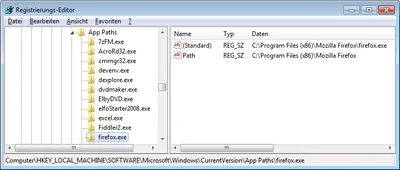
Why can you start Mozilla Firefox by typing “firefox” in the Run dialog and press enter? Firefox.exe is not located in any directory in the path. The same with Outlook (type “outlook”), PowerShell (“powershell”), VMware Workstation (“vmware”) or Adobe Reader (“acrord32”). This “magic application starting thingy” works because of a little-known Windows feature based on the “App Paths” registry key.
Windows Internals

How to Modify Default Share Permissions and Other Tweaks

NTFS permissions are stored in the file system, that is well known. But where are share permissions stored? As so often with Windows: in the registry. Network shares are defined by only a handful of relatively simple registry entries stored in the server service’s key which is, for historical reasons that go back way beyond OS/2, named “LanmanServer” (the workstation service is similarly named “LanmanWorkstation”).
Windows Internals

Registry Tricks

Registry Tricks
Here are some pretty cool ways to work with the Windows registry. Regedit Multiple Instances Start multiple instances of Regedit by appending the command-line parameter -m, e.g.: regedit -m. Multiple instances of RegeditExporting/Importing Favorites Regedit’s favorites are a handy way to get to keys you often need. The list of favorites is stored in the registry (where else?): HKCU\Software\Microsoft\Windows\CurrentVersion\Applets\Regedit\Favorites. Exporting the favorites to a .REG file can easily be automated with reg.exe (see below).
Tips and Tools

New Articles, Tools, Tips and Tricks: Bugs, Annoyances, PowerShell and some other Stuff

New Articles, Tools, Tips and Tricks: Bugs, Annoyances, PowerShell and some other Stuff
Bugs and Annoyances ICA connections initiated over the ICA client object (ICO) SDK fail because 128-bit encryption cannot be enabled. Apparently, setting EncryptionLevelSession does not work. Annoyingly, this bug is more than a year old, was fixed in the ICA client 10.2 and reappeared in the current version 11.0. Bugs like this one are bad for the entire Citrix ecosystem, because they break cool tools like Citrix Quick Launch, xConnect and others I may not even know about. [Update 2009-09-30: this bug has been fixed in ICA client 11.2.]
Tips and Tools

Registry Fun (Working With Hive Files)

Sometimes it is necessary to export/import data from or into the registry for some sort of additional processing. To this end, often regedit is used to create .REG files, which store a human-readable text interpretation of the registry content. .REG files can be edited easily with any capable text editor (even Notepad), and thus are a common way of making a collection of settings available to others. By the way, importing a .REG file’s data silently is done with the following command:
Windows Internals

Free Tool - List Registry Links (REG_LINK)

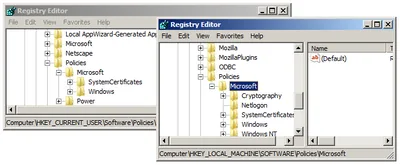
Recently I got into a very interesting discussion with my colleague Nicholas Dille on various aspects of Windows x64. One question he brought up was especially intriguing: knowing about registry redirection, it is not astonishing to find that the 32-bit version of the registry key HKLM\Software\Classes (aka HKCR) gets to be HKLM\Software\Classes\Wow6432Node. But there is also HKLM\Software\Wow6432Node\Classes!? How can there be two different Wow6432Node 32-bit keys for one 64-bit key?
Helge's Tools

Windows x64 Part 7: File System & Registry Redirection, Registry Reflection

This is the seventh part of a mini-series on Windows x64, focusing on behind the scene changes in the operating system. In the last article I explained that mixed 32-/64-bit processes are not allowed and how that rule affects both administrators and script-writers. In this context I mentioned the strangely named directory SysWOW64. Today I am going to explain what it is used for by starting with redirection.
64-Bit Windows (x64)

Another IT Legend

Some time ago I wrote about a misconception so common that it might pass as an IT legend - the confusion of HKU\.Default with the default user’s registry hive. Recently I came across another interesting misapprehension. As you know, the profiles base directory (usually C:\Documents and Settings) contains not only one special sub-folder, Default User, but also All Users, whose purpose is well-known: When Explorer builds the start menu and the desktop it pulls entries both from the logged-on user’s profile and from the all users folder. That is, by the way, the reason why standard users (i.e. non-admins) cannot modify some of the icons on the desktop and in the start menu - those that reside in the All Users folder, which is writeable only for administrators.
User Profiles