Now you can PROVE that it's not Citrix but the backend!

Now you can PROVE that it's not Citrix but the backend!
You have been there: end-users are complaining and your boss demands an explanation why “Citrix is slow” - again. You, the XenApp/XenDesktop admin, desperately look at Task Manager and Perfmon, but you cannot find a thing. Your servers are humming along quite nicely, but still: applications are slow, the system feels sluggish and logons are taking forever. And then, all of a sudden, things are back to normal. What was going on? How do you prevent that from happening again?
Networking

Boot IO Analysis with uberAgent for Splunk 1.5

Boot IO Analysis with uberAgent for Splunk 1.5
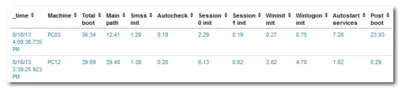
Analyzing slow boots is a difficult task. You need to install software like XPerf and master its far-from-intuitive command-line options to generate a trace file that you can then analyze. Once you find a possible cause for the long startup duration you never know if it is specific to the machine you analyzed or if it affects other PCs, too. In other words: XPerf, although powerful, is difficult to master. And it does not scale. uberAgent does. And it is super-easy to use.
Logs & Metrics

DiskLED - A Flexible Hard Disk and General System Activity Indicator System Tray Applet

DiskLED - A Flexible Hard Disk and General System Activity Indicator System Tray Applet
What do you do when your computer reacts sluggishly to even the simplest commands? You probably look at its hard disk LED to determine if the disk is busy, because if it is, the only thing that really helps is waiting (apart from buying a faster disk or SSD). Problem solved - if you are sitting right next to the machine. But what if you are using a protocol like RDP or ICA to connect to a remote computer or VM? No HDD LED, no quick and simple way to check for hard drive activity. This has been bugging me enough to write a software replacement: DiskLED.
Helge's Tools