Impact of GPU Acceleration on Browser CPU Usage

Impact of GPU Acceleration on Browser CPU Usage
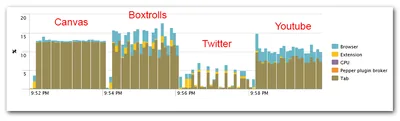
GPU acceleration is en vogue. After slowly but steadily moving out of the 3D niche it has arrived in the mainstream. Today, applications like Microsoft Office leverage the GPU, but even more so do web browsers. Chrome, Firefox, and Internet Explorer all have hardware acceleration turned on by default. People generally seem to be happy about that - GPUs are super-efficient, the more work they do the fewer remains for the CPU, overall energy consumption is reduced and battery life increases. Or so the myth goes. Interestingly, facts to prove that are hard to find. Nobody seems to have measured how GPU acceleration affects CPU usage. Let’s change that.
Performance/Sizing

Finding the Perfect Laptop Computer

Finding the Perfect Laptop Computer
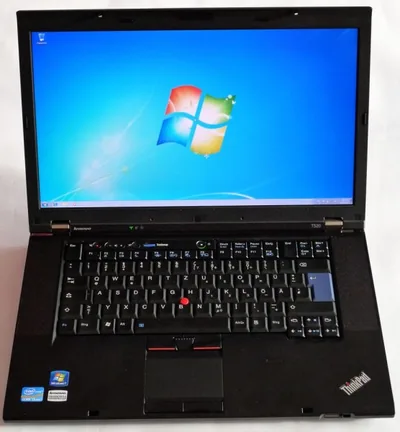
For a geek, one of the most fun things is choosing a new toy. I experienced this once again when I needed to buy a new laptop computer. The selection process was a lengthy one, during which I looked at and considered practically every model on the market. The benefits of that are twofold: I get a new device, whose strengths I appreciate and whose weaknesses I accept because I know there is no other model better suited for my needs on the market. You get this: a very personal laptop computer buyer’s guide.
Hardware

How to Analyze Kernel Performance Bottlenecks (and Find that ATI's Catalyst Drivers Cause 50% CPU Utilization)

How to Analyze Kernel Performance Bottlenecks (and Find that ATI's Catalyst Drivers Cause 50% CPU Utilization)
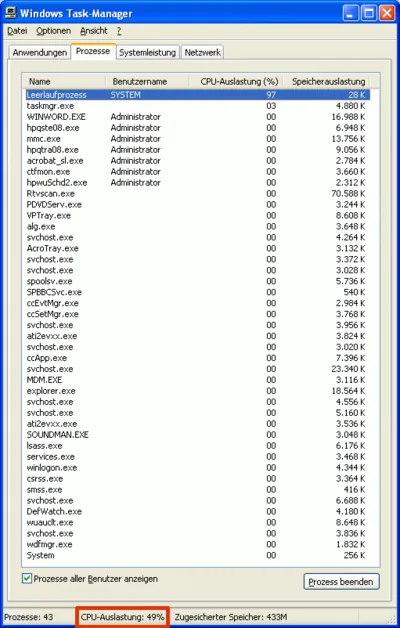
Normally, finding the cause for high CPU utilization is easy - just start Task Manager. But what if the component consuming CPU cycles is a driver that runs in the kernel? In that case, there is no regular process Task Manager could attribute the usage to. You will see the “System Idle Process” at around 98%, but the “Performance” tab might indicate 50% CPU usage. How can that be?
Performance/Sizing