How to Enable Drag and Drop for an Elevated MFC Application on Windows

Finding good information on how to enable drag and drop for MFC applications is hard enough (why?). But just when you think you should have it working, you hit a very solid wall: UIPI (User Interface Privilege Isolation, a variant of UAC, User Account Control). Because of “security” reasons, UIPI disables drag and drop from medium integrity processes (Explorer) to high integrity (aka elevated) processes by filtering out most window messages, including those required for drag and drop. In essence drag and drop from Explorer to your elevated application does not work.
Software development

Poll: Do Companies Use Local or Roaming Profiles for Desktop PCs?

Poll: Do Companies Use Local or Roaming Profiles for Desktop PCs?
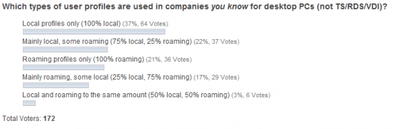
Would it shock you if 35% of all enterprises used roaming profiles on their desktop PCs? Well, that was the average I got when I asked via Twitter. But is that number correct? It might or might not be. It is based on the answers of only ten people, making it hardly statistically relevant. In the resulting discussion that was a topic, too. The obvious next step, suggested by Kimmo Jernstrom, was to ask more people. So here are the poll results.
User Profiles

.NET Applications on Windows x64 - Easy? Yes and No

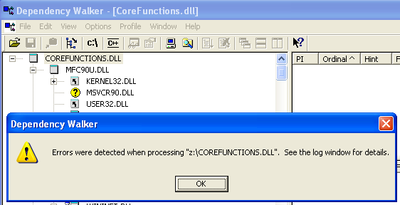
When migrating to 64-bit Windows, traditional “unmanaged” applications can pose challenges. That is because unmanaged binaries contain hardware-dependent CPU instructions - and the view on the hardware differs between 32- and 64-bit mode. But .NET? It should be unaffected of a system’s bitness since “managed” binaries contain instructions in a so-called intermediate language that is executed in a virtual machine at run-time and only then translated to machine language. But is it really? This article is about .NET programs that are dependent on OS bitness.
64-Bit Windows (x64)

Citrix User Profile Manager 5 Years Ago: Birth

Citrix User Profile Manager 5 Years Ago: Birth
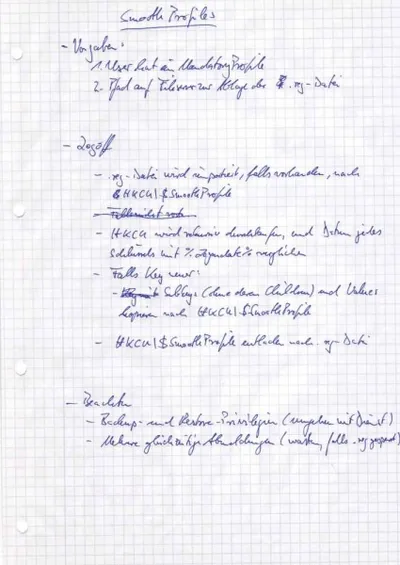
Citrix User Profile Manager is pretty well-known in the SBC space today. Five years ago, things were quite different. Citrix did not have a user profile solution, and neither did sepago. But we had an idea spinning in our heads we soon came to call Smooth Profiles. Slowly that idea became code, then was renamed to sepagoPROFILE, was acquired by Citrix and renamed again to User Profile Manager and then again to Profile management (with capital P and lower-case m!). You may have heard the latter part of the story. Here is a little something from the very beginning.
User Profiles

Visual Studio: Fixing Broken $(WindowsSdkDir) Variable

If you get weird errors in Visual Studio that basically state files like Windows.h cannot be found, the reason may be a missing or incorrect WindowsSdkDir variable. In my case, working with Visual Studio 2008 SP1 (32 bit) on Windows 7 x64 (64 bit) everything was fine until I installed the Windows 7 SDK. After that, no SDK files could be found any more and nothing would compile. Uninstalling the SDK (which I did not really need anyway - I had installed it only to get at XPerf) did not help. After some research, I found out that the Visual Studio internal variable WindowsSdkDir (which is not an environment variable) was missing from the registry. After adding the following, everything worked like a charm again:
Software development

Syntax Highlighting PowerShell Code in HTML - With a PowerShell Script

When you are publishing PowerShell code on the web, you soon discover that it looks much nicer with syntax highlighting - as did I. There are several ways to add syntax highlighting to your blog or web site, most of which rely on external (Wordpress) plugins or JavaScript on the page. I do not like that approach too much. I prefer to have the syntax highlighting embedded in the HTML code. That way I have full control over the appearance (and the highlighting also works in the RSS feed). The logical solution is to use a script that embeds HTML coloring tags directly into the script.
Scripting

PowerShell Script Lists App-V Package Dependencies (Dynamic Suite Composition, DSC)

Update 2010-04-20: Thanks to Stefan Henseler the script now works correctly with multiple dependencies in a single file. Be sure to download the current version below. App-V’s Dynamic Suite Composition is a powerful feature in that it allows multiple “bubbles” to share the same virtual environment. In other words, package A can be made dependent on package B. But if DSC is used extensively, dependencies between packages tend to become difficult to manage - there seems to be no simple way of listing all packages’ dependencies. Well, I have written a PowerShell script that does just that.
Scripting

How to Analyze Kernel Performance Bottlenecks (and Find that ATI's Catalyst Drivers Cause 50% CPU Utilization)

How to Analyze Kernel Performance Bottlenecks (and Find that ATI's Catalyst Drivers Cause 50% CPU Utilization)
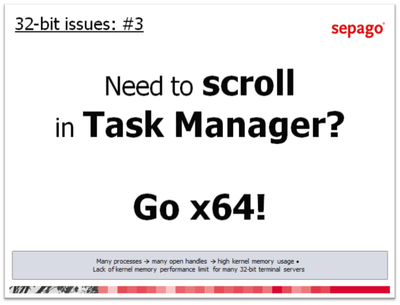
Normally, finding the cause for high CPU utilization is easy - just start Task Manager. But what if the component consuming CPU cycles is a driver that runs in the kernel? In that case, there is no regular process Task Manager could attribute the usage to. You will see the “System Idle Process” at around 98%, but the “Performance” tab might indicate 50% CPU usage. How can that be?
Performance/Sizing

Fixing Office 2007's Quick Access Toolbars With Citrix User Profile Manager

Fixing Office 2007's Quick Access Toolbars With Citrix User Profile Manager
Not sure where user profile management might be useful? Here is an example that should apply to almost everyone. The obvious new user interface feature of Microsoft Office 2007 is the ribbon. But there are numerous other UI enhancements over Office 2003. One of these are the Quick Access Toolbars. If you are not sure what I am talking about: the following screen shot should give you an idea (from a German version of Office, sorry):
User Profiles

Should Roaming User Profiles Be Backed Up?

This article is part of Helge’s Profile Toolkit, a set of posts explaining the knowledge and tools required to tame Windows user profiles. This may seem like a silly question, but whether or not to include roaming user profiles in your enterprise backup solution may greatly affect both the performance and the cost of that solution. With that in mind, it is only logical to pose the question if the content stored in user profiles is valuable enough to be backed up.
User Profiles

New Articles, Tools, Tips and Tricks: Windows, Hyper-V, Citrix, PowerShell and Application Streaming / App-V

Windows Beginning with Vista, when formatting a drive the entire disk is overwritten with zeroes. While this is good for end users who like to wipe all data prior to selling or throwing away a disk drive, SAN-based volumes should not be formatted like this. Perform a quick format instead. But if you want to make sure the data is really gone - no need for “secure erase” programs any more! The need for multiple overwrites is a myth.
Tips and Tools

Citrix Products 2010: A Wish List

What would Joe, a Citrix admin, put on his Christmas wish list? Here are some guesses in no special order. XenApp A version of XenApp that runs on Windows Server 2008 R2 One console only, at least for XenApp PowerShell SDK for managing XenApp Realtime audio/video so that, for example, Microsoft Office Communication Server can be used well Migration tool that exports an old farm’s settings and imports them after optional transformation into a new farm Support for XenApp in SCCM (Microsoft System Center Configuration Manager)
Citrix/Terminal Services/Remote Desktop Services

What is a CTP Meeting all about?

I just returned from my first CTP (Citrix Technology Professional) meeting and thought I might share a few experiences. The meeting took place in one of Citrix’s headquarter buildings in Fort Lauderdale, Florida. The meeting itself ran over two days, which means that most attendees were away from home and work for four. While that is certainly nice to know, the question you probably have is: “What does actually happen during such a meeting?”
Citrix/Terminal Services/Remote Desktop Services

Virtualization - Old Hat?

Although humans in general and members of its subspecies “marketing manager” in particular tend to treat currently “hot” topics as new and revolutionary, they only rarely are. In fact, “new” should be considered as in “new wine in old bottles” rather than in “did not exist before”. Take virtualization. Although the topic of the day seems to be cloud computing, virtualization can probably still be called “hot” (especially since a cloud also is a kind of virtualization). But is it new? Judge for yourself: Below I have compiled a list of boring old technologies that employ virtualization.
Virtualization & Containers