Poll: Do Companies Use Local or Roaming Profiles for Desktop PCs?
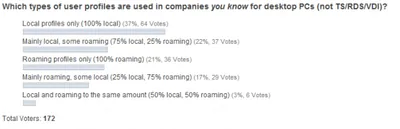
Poll: Do Companies Use Local or Roaming Profiles for Desktop PCs?
Would it shock you if 35% of all enterprises used roaming profiles on their desktop PCs? Well, that was the average I got when I asked via Twitter. But is that number correct? It might or might not be. It is based on the answers of only ten people, making it hardly statistically relevant. In the resulting discussion that was a topic, too. The obvious next step, suggested by Kimmo Jernstrom, was to ask more people. So here are the poll results.
User Profiles

Citrix User Profile Manager 5 Years Ago: Birth

Citrix User Profile Manager 5 Years Ago: Birth
Citrix User Profile Manager is pretty well-known in the SBC space today. Five years ago, things were quite different. Citrix did not have a user profile solution, and neither did sepago. But we had an idea spinning in our heads we soon came to call Smooth Profiles. Slowly that idea became code, then was renamed to sepagoPROFILE, was acquired by Citrix and renamed again to User Profile Manager and then again to Profile management (with capital P and lower-case m!). You may have heard the latter part of the story. Here is a little something from the very beginning.
User Profiles

Fixing Office 2007's Quick Access Toolbars With Citrix User Profile Manager

Fixing Office 2007's Quick Access Toolbars With Citrix User Profile Manager
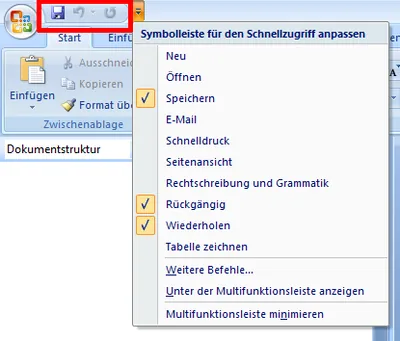
Not sure where user profile management might be useful? Here is an example that should apply to almost everyone. The obvious new user interface feature of Microsoft Office 2007 is the ribbon. But there are numerous other UI enhancements over Office 2003. One of these are the Quick Access Toolbars. If you are not sure what I am talking about: the following screen shot should give you an idea (from a German version of Office, sorry):
User Profiles

Should Roaming User Profiles Be Backed Up?

This article is part of Helge’s Profile Toolkit, a set of posts explaining the knowledge and tools required to tame Windows user profiles. This may seem like a silly question, but whether or not to include roaming user profiles in your enterprise backup solution may greatly affect both the performance and the cost of that solution. With that in mind, it is only logical to pose the question if the content stored in user profiles is valuable enough to be backed up.
User Profiles

Citrix User Profile Manager (UPM) and the Broken Rootdrive

Citrix User Profile Manager (UPM) and the Broken Rootdrive
Terminal server application compatibility scripts have been around for a long time - so long in fact, that I considered them a legacy and stowed away any knowledge of them in a very remote area of my brain. When a Citrix customer brought up a problem with the mapping of ROOTDRIVE in the User Profile Manager forum, at first I had no clue what he was talking about. Luckily, the customer was able to pin the problem down to a specific command that failed when, and only when, User Profile Manager was processing the logon. This is the story of UsrLogon.cmd, ACRegL.exe and UPM.
User Profiles

Replicating User Profiles Between Sites (With or Without DFS) - Why it Should be Avoided

This article is part of Helge’s Profile Toolkit, a set of posts explaining the knowledge and tools required to tame Windows user profiles. Roaming user profiles seems like such a good idea at first, but it causes a myriad of problems in practice. One of these problems stems from the fact that the master copy of each profile is stored on a central file share. That file share needs to be accessible over a fast connection from all machines a user is logging on to, or logons tend to become very slow. This proximity requirement is easy to meet if only one site is involved, but what if users roam between different locations, or if terminal servers are distributed across several data centers? Unfortunately, there is no easy answer to this question.
User Profiles

Folder De-Localization with Citrix User Profile Manager (UPM)

Windows user profiles prior to Vista / Server 2008 contain localized folder names. End users expect that, of course, but admins tend to hate it because automated management becomes much more difficult. How can this dilemma be resolved? End users only see the local copy of the profile, while admins mostly have to deal with the central copy on a file server. Wouldn’t it be cool to have a “translator” component that makes sure local folders are localized while central folders are in one language only?
User Profiles

User Profile and Home Directory Storage: Distributing the Load Across Multiple File Servers

This article is part of Helge’s Profile Toolkit, a set of posts explaining the knowledge and tools required to tame Windows user profiles. The easiest way to assign user profile and home directories is via group policy. But that can only be done per computer. There is no (simple) way to point different users’ directories to different file servers. So what? No problem at all, until the number of users is too large for a single file server to handle. This article discusses what can be done to spread the user load.
User Profiles

Citrix User Profile Manager: How Registry Exclusion Lists Can Mess Up Group Policy Processing

The documentation of Citrix User Profile Manager (UPM, for short) recommends excluding the following registry keys from processing: HKEY_CURRENT_USER\Software\Policies HKEY_CURRENT_USER\Software\Microsoft\Windows\CurrentVersion\Policies The net effect of this is that the Citrix profiles managed by UPM do not contain any policy settings. The reasoning behind this being: Policies are reapplied anyway during the next logon, so there is no reason to waste CPU cycles on synchronizing such “redundant” information.
User Profiles

Mandatory Profiles - The Good, the Bad and the Ugly

This article is part of Helge’s Profile Toolkit, a set of posts explaining the knowledge and tools required to tame Windows user profiles. A mandatory profile is a special type of roaming profile. As with a roaming profile, a mandatory profile is copied from its network location to the local machine during logon. But during logoff, changes are not copied back. Instead, the local copy of the mandatory profile is reset to its initial state at the next logon. In essence, mandatory profiles are read-only roaming profiles. This has advantages, but also severe drawbacks.
User Profiles

Enter ProfileNurse - Your Skilled Profile Care Professional

Enter ProfileNurse - Your Skilled Profile Care Professional
Enter ProfileNurse - Your Skilled Profile Care ProfessionalUser profiles can be bitchy. A single misbehaving profile is bad enough, but what if you have hundreds or thousands of them? Most admins have a boatload of profiles strewn across file servers, and no way of knowing anything about them because they are lacking the management tools. That’s where ProfileNurse comes in, a free tool for offline profile management. It can not only manipulate arbitrary settings stored in profiles but also gather different kinds of information about each profile on a file server.
User Profiles

How to Reduce the Size of Roaming Profiles

This article is part of Helge’s Profile Toolkit, a set of posts explaining the knowledge and tools required to tame Windows user profiles. Roaming user profiles tend to grow over time, which is sometimes referred to as profile bloat. In and by itself, profile growth is not a problem. Users of desktop PCs who log on the the same machine every day will not even notice that they have huge profiles ready to follow them around the network. Their locally cached copy of the roaming profile is always current. No need to fetch anything from a file server during logon.
User Profiles

Another IT Legend

Some time ago I wrote about a misconception so common that it might pass as an IT legend - the confusion of HKU\.Default with the default user’s registry hive. Recently I came across another interesting misapprehension. As you know, the profiles base directory (usually C:\Documents and Settings) contains not only one special sub-folder, Default User, but also All Users, whose purpose is well-known: When Explorer builds the start menu and the desktop it pulls entries both from the logged-on user’s profile and from the all users folder. That is, by the way, the reason why standard users (i.e. non-admins) cannot modify some of the icons on the desktop and in the start menu - those that reside in the All Users folder, which is writeable only for administrators.
User Profiles