Citrix/Terminal Services/Remote Desktop Services
Category 46 posts
CitrixTerminal ServicesXenDesktopXenAppClearTypeFont SmoothingRemote Desktop Services

Citrix Synergy 2016 Call for Topics: Get Rid of the Video Requirement (Open Letter)

It smacks of lazy reviewers looking for eye-candy. Simon Crosby, former Citrix CTO Citrix Synergy Team, I am writing to you as a guy who has presented many times at Synergy. This year alone I had three sessions, one in cooperation with my community peers Aaron Parker and Shawn Bass, the other two on my own - one in the Geek Speak track, the other in the regular Synergy breakout session track. All three sessions were a great success and have been rated highly.
Citrix/Terminal Services/Remote Desktop Services
Citrix XenApp 7.6 Logon Slow - Long Black Screen Phase

Citrix XenApp 7.6 Logon Slow - Long Black Screen Phase
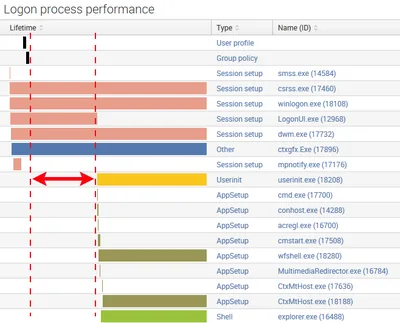
Update 2015-04-28: Citrix provides the limited release hotfix ICATS760WX64009 that fixes this issue. More information below. During the research for my session about the XenApp 7.6 logon process, to be presented at Citrix Synergy and BriForum London, I noticed that the logon to my XenApp 7.6 lab server was taking a bit long. Longer, in fact, than the combined durations of the main logon phases user profile loading, group policy processing, logon script execution and shell startup. Much longer. Also much longer than on an otherwise similar XenApp 6.5 machine.
Citrix/Terminal Services/Remote Desktop Services
Is my App Running on Citrix XenDesktop/XenApp?

Is my App Running on Citrix XenDesktop/XenApp?
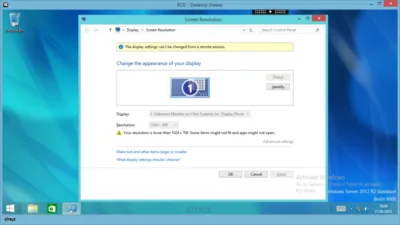
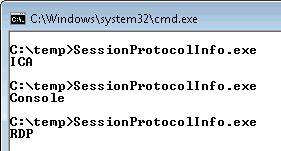
How do you programmatically determine if an application is running in a session accessed over a remoting protocol (i.e. ICA aka HDX or RDP)? It may be Citrix’ strategy to completely hide the fact that a session is remoted - which makes sense in many ways - but in some cases developers simply need to know in order to optimize their applications. It is surprisingly difficult to find official documentation about this. Here is what you need to know.
Citrix/Terminal Services/Remote Desktop Services
Solved: Citrix Desktop Service Fails to Start, Logs Event 1006

Solved: Citrix Desktop Service Fails to Start, Logs Event 1006
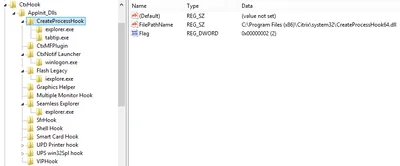
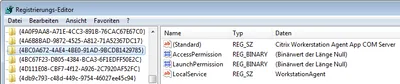
I am sure you all love XenDesktop VDAs that just won’t register. Although this is becoming less and less of a problem I had another case recently. Checking the Obvious When a XenDesktop VDA is unregistered the first thing I do is check if the VM is actually turned on. With that out of the way I turn to the application event log, looking for entries with the source Citrix Desktop Service. This usually tells you what the problem is. Not this time, however. Apparently the Citrix Desktop Service (aka WorkstationAgent) ran into some error during startup. It logged the following event with ID 1006 and stopped:
Citrix/Terminal Services/Remote Desktop Services
Configuring Citrix ShareFile Sync from PowerShell

Configuring Citrix ShareFile Sync from PowerShell
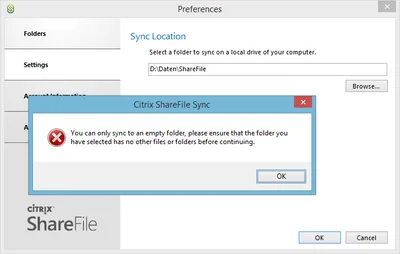
When you have a cloud-based file sharing service it makes a lot of sense to synchronize part or all of the data with your desktop computer. Citrix ShareFile offers the Sync for Windows tool for that purpose. However, once you open its configuration screen you notice that has a severe restriction: it can only synchronize to a single local folder. In many cases it would make much more sense to synchronize different cloud folders to different locations on your hard disk. When I complained to the product manager Peter Schulz about this I learned about a hidden gem: the single folder restriction is only present in the UI; the underlying sync engine is much more flexible. And the best thing is: the sync engine can be configured from PowerShell. Here is how.
Citrix/Terminal Services/Remote Desktop Services

Persistent VDI in the Real World - Storage

Persistent VDI in the Real World - Storage
This is the second article in a multi-part series about building and maintaining an inexpensive scalable platform for VDI in enterprise environments. Previously in this Series I started this series by defining requirements. Without proper requirements, everything else is moot. Remember that we are looking at running typical enterprise desktop workloads, we are trying to centralize desktops and our primary desktop hosting technology is multi-user Windows, aka RDS/XenApp.
Citrix/Terminal Services/Remote Desktop Services
Persistent VDI in the Real World - Architecture

Persistent VDI in the Real World - Architecture
This is the first article in a multi-part series about building and maintaining an inexpensive scalable platform for VDI in enterprise environments. Requirements Before we can even start to think about a possible architecture, we need requirements. Only requirements enable us to make choices that benefit the customer. Without proper requirements we are not building for the real world but for some alternate reality. Please keep in mind when reading this article that the solution presented here only makes sense for you if your requirements are similar.
Citrix/Terminal Services/Remote Desktop Services
Shutting Down Unused Persistent XenDesktop VMs

Shutting Down Unused Persistent XenDesktop VMs
When you use XenDesktop the only way it makes sense you may find that Citrix has not really put much effort into making that a smooth experience. Persistent is a Second-Grade Citizen XenDesktop is really designed to be used with pooled desktops - machines that are reset to a pristine state when the user logs off. Of course, stateless desktops are much better (and, importantly, cheaper) served from XenApp. This has been the topic of many a debate which I will not repeat here. But I will state that if you give a so-called knowledge worker a personal desktop, you better make sure that desktop is persistent.
Citrix/Terminal Services/Remote Desktop Services
Contest: Why Is This Desktop Empty?

Contest: Why Is This Desktop Empty?
I just had a situation where I was facing an empty desktop with no way to logoff, start a program or do anything else. The only thing left to do was to log the session off from an admin session. This got me thinking: how many ways are there to create such a situation? I am writing down all the ways I know of and ask everybody to contribute. Can you come up with a way to end up with a completely empty desktop I and no one else thought of before?
Citrix/Terminal Services/Remote Desktop Services
How-to: XenApp/RDS Sizing and Capacity Planning with uberAgent for Splunk

How-to: XenApp/RDS Sizing and Capacity Planning with uberAgent for Splunk
Do you know the maximum number of users each of your terminal servers can host with acceptable performance? You may have found out the hard way how many are too many - but how many are just right? Farm sizing and server capacity planning are typical tasks for consultants who often have a hard time fighting the peculiarities of perfmon and logman trying to get the data they need for their calculations. It can be so much easier at no additional cost. The 60-day Enterprise Trial version of Splunk in conjunction with an evaluation license of uberAgent give all the information you need in much less time. Here is how.
Citrix/Terminal Services/Remote Desktop Services