Working with the Amazon CloudFront CDN
- Website
- Published Sep 7, 2011
This is a compilation of things learned while setting up Amazon CloudFront as a CDN for my Wordpress site as well as using it as software distribution network.
CNAMEs
Adding a CNAME
A CloudFront distribution can be used with ten different CNAMEs. Adding a CNAME is simple enough if you keep in mind that configuring the CNAME in DNS is not sufficient; each CNAME must be added to the distribution’s properties, too.
Removing a CNAME
Removing a CNAME is equally simple, but there is one caveat: you might have CSS or other objects in the CDN’s cache that still refer to the CNAME. Such objects must be deleted from CloudFront’s cache. See below how to do that.
Deleting an Object from the Cache
If you use CloudFront as a distribution mechanism for downloads like I do, at some point in time you want to update your files - and you want that update reflected in the CDN quickly.
For a long time this was not possible with CloudFront. Amazon suggested lame workarounds involving giving each version a unique name, but then in 2010 they added this essential feature. Unfortunately, it is not available from the AWS Management Console, only via API calls. But there are a tools that make use of the API to provide the purge functionality.
W3 Total Cache
This Wordpress plugin comes with support for CDNs and Amazon CloudFront. To purge an object click “CDN” and then “Purge”:
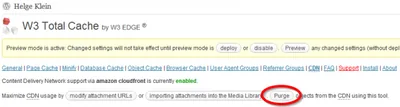
A popup window opens. Enter the relative path without leading slash and click “Purge”.
Bucket Explorer
Bucket Explorer is a commercial tool for managing Amazon S3 and CloudFront. It comes with a fully functional 30-day trial version which I used for my tests.
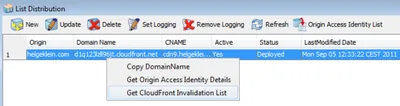
After starting the tool and entering access key ID and secret key Bucket Explorer lists my S3 buckets. To manage CloudFront, click “Distribution”. In the window that pops up, right-click your distribution and select “Get CloudFront Invalidation List”:
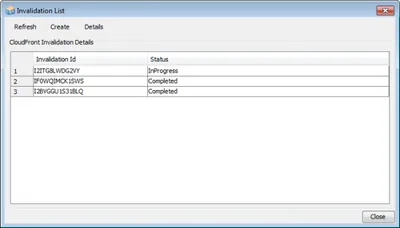
The invalidation list window pops up and displays both past and current invalidations (read: deletes). You can create new invalidations and check if an invalidation is still being processed by the CDN or if it is completed:
Processing Time
Each change to a CloudFront distribution needs to travel through the CDN’s network to all nodes before it is activated. That may take some time; my changes were through in 10-20 minutes.








Comments