Wordpress Author Page Not Found (Error 404) if Space in URL?
- Website
- Published Nov 8, 2010 Updated Jul 14, 2019
I had a strange error on this Wordpress installation: The author page would not display, instead, I got a 404 (not found). This is the description of how I fixed it.
The Problem
Below each blog post, Wordpress typically displays a link to the author. If you click on it, you navigate to the author’s page, which lists all posts by that specific author. This is what the link looks like on this site:
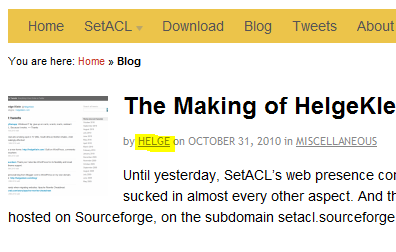
The URL Wordpress generated for that link was in my case: https://helgeklein.com/blog/author/Helge%20Klein/
Notice something? It has a space in it, encoded as “%20”. And that seems to be the cause of the problem. When clicking on the link, Wordpress cannot find a corresponding page and displays the 404 error page.
I did not find a way to change the author link in the user interface. Neither does my user name include a space. And it has posts associated with it (I mention this because some people have reported getting a 404 for users without posts).
The Resolution
After searching for too long I found the solution here. It is pretty easy, given that you are not afraid of editing the database directly. What you need to do is locate your user record in the table “wp_users” and edit the field “user_nicename”. That is easiest done via phpMyAdmin. In my case the nice name was “Helge Klein”. I changed it to “Helge-Klein”, replacing the space with a dash and the problem was gone.





Comments