Windows 8 Storage Spaces: Bugs and Design Flaws
- Storage
- Published Mar 26, 2012 Updated Mar 27, 2012
When I first read about Storage Spaces in the Windows 8 blog, I was enthusiastic. Finally a replacement for the drive extender technology Microsoft let die so cruelly. Having used Storage Spaces for several weeks now, I am not so sure any more.
What For?
In this article I focus on the media server use case. More and more people need a fool-proof and affordable way to store multiple terabytes of pictures, music, videos and similar content. Traditional storage solutions (including NAS devices) simply do not cut it. They are either too difficult to use, do not provide good data protection or are too expensive. Or all of the above.
Storage Spaces
This is how I summarized the capabilities of Storage Spaces after the initial announcement:
Multiple internal or external drives can be combined to a disk pool out of which one or more thinly-provisioned Storage Spaces can be carved. Spaces are fault tolerant (using either parity or mirroring) and may consist of disks of different types and sizes (minimum one, no fixed maximum). Similar to the deprecated Windows Home Server Drive Extender Spaces can be expanded by adding additional disks. Failed drives can be replaced while a disk pool is online. Enclosures with a disk pool can be connected to different Windows 8 computers and may be used there if more than half of the disks are available.
That sounds really good. Here is the reality check.
Architecture
A Storage Space operates at the block level while it should work at the file level instead. The benefit of potentially high read speeds (chunks from larger files are stored on different drives and can be read concurrently) is not relevant in SOHO scenarios. But the increased probability of error is.
By splitting files into chunks (called “slabs”) and striping these across disks, it becomes:
- impossible to access a single disk’s data without all other disks being accessible
(you cannot take a disk from the pool and read its data in another computer) - impossible to add existing disks to the pool without losing the data stored on them
(when adding a disk to the pool, it is initialized and formatted - importing data into the pool by adding a new disk does not work) - impossible to convert between different redundancy types (none, parity, mirror)
- much more likely that the entire system breaks because failure of a single drive destroys all data on all disks (two drives with parity or one-way mirror)
(in file-based solutions, in case of disk failure only the data on the failed disk is lost, the remainder of the pool remains unaffected)
Implementation
In its current state, Storage Spaces suffer from several bugs that severely impact their usefulness:
- There is no way to change the redundancy mode of existing Storage Spaces without reinitializing the Spaces, deleting all data.
- Only hard disks of identical size can efficiently be combined into a storage pool, because: (maximum size) = (size of smallest disk) * (number of disks)
If you have two 3 TB disks and add a 1 TB disk, you get: 3 TB. 4 TB out of the total capacity of 7 TB are not used. This is discussed
here and the following screenshot from my own system clearly shows the unequal utilization of the disks: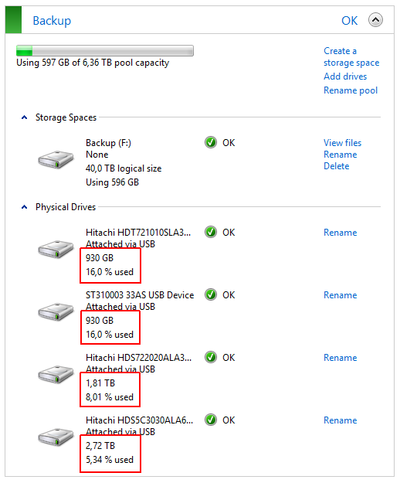
Storage Spaces 2 - Drives of different sizes not used efficiently - When adding a new drive to a pool, existing data is not rebalanced. Existing disks stay the way they are (nearly full), while the new drive hardly stores any data:
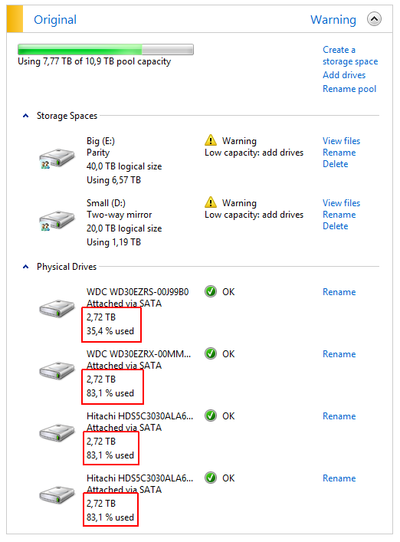
Storage Spaces 1 - Existing data not redistributed to additional drive - When copying data to a Storage Space until it is full, the copy operation runs into some kind of loop with the kernel consuming near 50% CPU. A restart is required to stop that.
- Low write performance, especially to Storage Spaces in parity mode, but also to Spaces in two-way mirror mode. I have written about that before.
Alternatives
The demise of Drive Extender inspired several developers to create their own variant of a flexible, inexpensive and fool-proof storage pool solution. These are the ones I have found and read good things about:
- DriveBender
Creates a storage pool of multiple drives. Drives can be added to the pool without losing the data stored on them. Existing data is rebalanced so that files are distributed evenly. Drives that have been removed from the pool can be used on any Windows machine without losing data. Optionally files in some or all folders can be duplicated. Does not offer parity as a redundancy mode.
Does not currently work on Windows 8 CP. - StableBit DrivePool
Surprisingly similar to DriveBender but only for Windows Home Server 2011, Windows Small Business Server 2011 Essentials and Windows Storage Server 2008 R2 Essentials. - FlexRAID
More options than DriveBender and DrivePool, but also much more complex. Apparently no trial version available. - SnapRAID
Free command-line copy/backup tool that stores files across multiple drives. Optionally, 1 or 2 drives can be designated for parity (this requires the largest drives in the pool to be used for parity, though).
Conclusion
While I hope that Microsoft will fix the implementation issues present in the consumer preview version of Windows 8, I do not think that they will change the architecture in any substantial way. That is really unfortunate - the chance to provide a fool-proof way of managing the terabytes of data found in modern homes has been lost. Luckily several very interesting third-party products are available.




Comments