Solved: "Other" Eating Up Gigabytes of iPad Storage
- Miscellaneous
- Published Feb 27, 2012 Updated Feb 26, 2012
In preparation for next week’s MVP summit I wanted to fill my iPad with movies for in-flight entertainment when I noticed that a large part of my iPad’s storage capacity was taken up by stuff from some unexplained “other” category. Here is my account of what I did to get rid of it and reclaim the lost gigabytes.
When I looked at my iPad’s storage capacity graph in iTunes I saw this:

Nearly 8 GB taken up by “other”. That smelled like someone not doing his homework. While I understand that apps need (temporary and permanent) storage capacity for things like a browser cache, downloaded files, sent messages and similar things, 8 GB is way too much for that kind of stuff.
When I searched the web looking for a way to reduce the size of “other”, I was astonished by the number of people with exactly the same problem (here, for example). None of them seemed to have a solution, though. The usual tips (closing apps, restarting, restoring the device from a backup) certainly did not seem to help.
Obviously the growth of the “other” category is a combination of bugs in various applications (including Apple’s) not cleaning up their temporary files and a lack of the corresponding cleanup functionality in the operating system.
Many people would think that there is no way out since iOS is a closed system. But there are cool things you can do even if you have not jailbroken your iPad. One of those is to download iExplorer (available for Windows and OS X), a very useful little application that is basically a file browser for your iOS device. When I looked around the folders on my iPad I noticed many large files in “Purchases”:
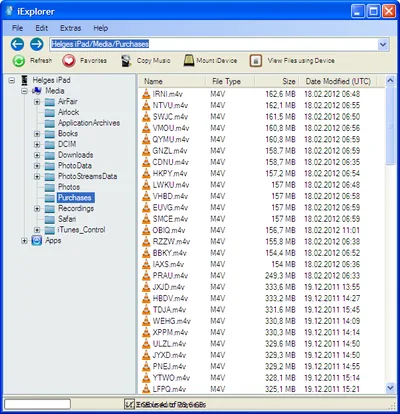
I remembered that I had deleted several TV show episodes to make room for new ones, and these deleted files seemed to have fled to the Purchases folder. Having synchronized everything to my PC earlier I mercilessly deleted every single file in “Purchases”. When I checked in iTunes, the formerly lost space was reclaimed:







Comments