Solved: Disabling the BitLocker Service via GPP Fails

  • Permissions
  • Published Apr 17, 2012 Updated Apr 16, 2012

If you want to disable the BitLocker service via Group Policy Preferences, you will find that you cannot. The service’s startup mode stays at “manual” and the following event is logged to the application event log:

Type:     Warning
Source:   Group Policy Services
Event ID: 4098
User:     SYSTEM
Text:     ... error code 0x80070005 access denied ...

Other services can be disabled without any problems.

Analysis

The “access denied” message points to a problem related to permissions. Looking at the BitLocker service’s permissions in SetACL Studio, we see:
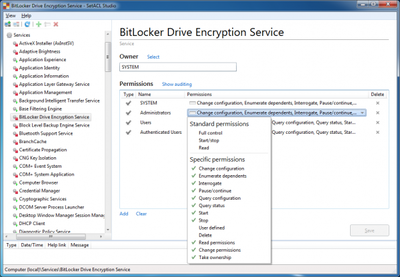
BitLocker service permissions

When we compare that with some other service’s permissions, we notice that other services have a much simpler permission setup, where Administrators simply have full control:
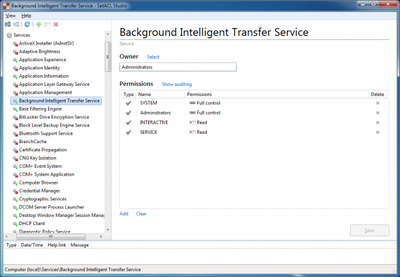
BITS service permissions

Solution

Once Administrators have full access, disabling the BitLocker service works flawlessly. Service permissions changes can be automated easily with SetACL. To grant Administrators full access to the BitLocker service use the following command:

SetACL -on BDESVC -ot srv -actn ace -ace n:Administrators;p:full
Comments

Related Posts

Latest Posts

Fast & Silent 5 Watt PC: Minimizing Idle Power Usage

Fast & Silent 5 Watt PC: Minimizing Idle Power Usage
This micro-series explains how to turn the Lenovo ThinkCentre M90t Gen 6 into a smart workstation that consumes only 5 Watts when idle but reaches top Cinebench scores while staying almost imperceptibly silent. In the first post, I showed how to silence the machine by replacing and adding to Lenovo’s CPU cooler. In this second post, I’m listing the exact configuration that achieves the lofty goal of combining minimal idle power consumption with top Cinebench scores.
Hardware

Fast & Silent 5 Watt PC: Lenovo ThinkCentre M90t Modding

Fast & Silent 5 Watt PC: Lenovo ThinkCentre M90t Modding
This micro-series explains how to turn the Lenovo ThinkCentre M90t Gen 6 into a smart workstation that consumes only 5 Watts when idle but reaches top Cinebench scores while staying almost imperceptibly silent. In this first post, I’m showing how to silence the machine by replacing and adding to Lenovo’s CPU cooler. In a second post, I’m listing the exact configuration that achieves the lofty goal of combining minimal idle power consumption with top Cinebench scores.
Hardware