Show Me Your Start Menu and I'll Tell You Who You Are
- Miscellaneous
- Published Oct 17, 2012 Updated Sep 26, 2012
A Windows 7 start menu tells a lot about the user that, indirectly, created it. This is what mine looks like:
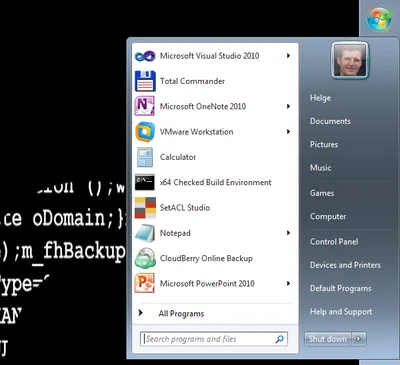
So what does that say about me?
Background
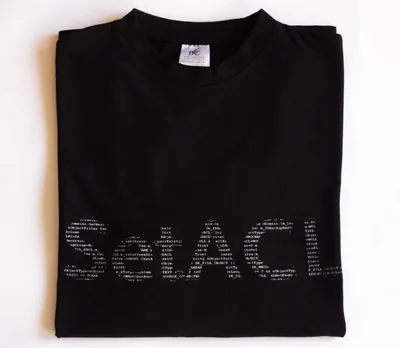
This is the SetACL lettering with characters consisting of actual source code I am offering on t-shirts, too.
Aero?
You might notice that I am not using Aero Glass. The reason for that is simple: I find that the task switching dialog (the one that pops up when you press ALT+TAB) is utterly useless when Aero Glass is enabled: all Window previews look the same. Yet when I switch tasks I want to be able to recognize in fractions of a second which is which. The application icons are much better suited for that. Luckily in Windows 8 Aero Glass is gone.
Start Menu Location
With today’s monitors getting wider and wider screen height is a scarce resource. It is only logical to move the start menu to one of the sides. I prefer the right side. The left would do just as well, though.
Language
I am German, and I like my country and its language. But I blog in English, and I do not want to fire up a VM every time I need the exact name of some system component or want to take a screen shot.
Applications
Visual Studio
What else would I use for developing my tools? SetACL and Delprof2 are written in C++, SetACL Studio is written in C#. Visual Studio is the perfect IDE for both languages on Windows.
Total Commander
Total Commander and Chrome, which is not in the list because I always run it by pressing WIN+R and entering “chrome”, are the most important applications to me. There is no faster way to handle files than controlling Total Commander with keyboard shortcuts.
OneNote
Very useful for keeping all kinds of lists and notes. I synchronize it to the cloud so that I have my notes on my phone, too.
VMware Workstation
I tried to make do with Virtual Box for a while. It is nearly there - but not quite. VMware Workstation it is, there is no alternative. Not even Windows 8 Hyper-V, because that does not have a NAT network configuration providing internet access to the guest while hiding the VM from the network and allowing communication between host and guest.
Calculator
Not much needs to be said, except that I use this as a test application when I need to launch a process to verify some tool of mine is working correctly.
x64 Checked Build Environment
I recently dipped my toe into driver development. Cool things ahead!
SetACL Studio
No easier way to manage permissions than with SetACL Studio.
Notepad
I do not use this primitive thing as an editor, of course. I have Notepad++ for that. But, believe it or not, until yesterday I did not have text files associated with Notepad++. Although I normally use Total Commander’s edit command, which opens Notepad++, sometimes I would double-click a text file - ending up with Notepad. Eventually that annoyed me so much that I changed the file type association.
CloudBerry Online Backup
I am very happy with this backup application. I use it to regularly back up all my files to Amazon S3 in addition to the synchronization to my home server. The home server is great for large files like videos and for quick restore, but it just sucks as the only backup target. Think: fire, water, burglary.
PowerPoint
I use this manager toy mainly for my talks at conferences and user groups.
What About You?
What does your start menu look like?






Comments