Searching for Keyword Strings in WordPress Posts
- Website
- Published Mar 26, 2019 Updated Dec 31, 2019
Surprisingly, there does not seem to be a plugin or some other “easy” way of searching your WordPress posts for certain keywords, shortcodes or HTML tags. However, if you have ever been through a theme migration, you know that standardizing on HTML tags and shortcodes makes the process a lot less painful. If you know what you are looking for, this solution to search your posts’ content might be just what you need.
Why Not Use a Plugin or Something?
The plugins I found seem to be focused on searching and replacing. That was not what I was looking for. I simply wanted a way to identify posts where certain strings were used in the content.
Sadly, the same is true for WP-CLI, an otherwise fantastic utility. It does not have a “search only” mode, either.
What You Need
I do not have phpMyAdmin on our server, mostly for security reasons. But I do have SSH access. That leaves me with command line tools whenever I need to do things that go beyond WordPress’ UI.
This article assumes that you can SSH to your server and run MySQL commands.
Connecting to the Database
Connect to your MySQL instance:
mysql -u root -p
You will be asked for root’s database password. Once you entered it successfully you can run SQL queries, e.g. to list databases:
show databases;
The result should look similar to the following:
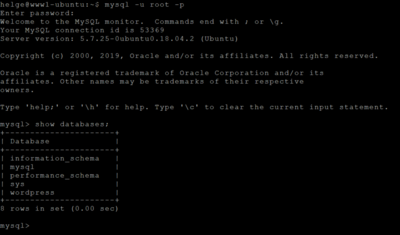
Next, select your WordPress database (make sure to use the right database name from the list above):
use wordpress;
The following commands will affect the selected database wordpress.
Searching the WordPress Database
Now we can search the posts for keywords. I was preparing for a migration and wanted to list posts that contained certain shortcodes, e.g. “[quote]”. The following command lists all post containing that string:
SELECT ID, POST_TITLE FROM wp_posts WHERE post_content LIKE '%[quote]%' AND post_status = 'publish';
Note that the search term is enclosed in percent signs (SQL’s wildcard character). Also, note the check for the published status. Without the latter, you will get post revisions, too.
The result looks like this:
mysql> SELECT ID, POST_TITLE FROM wp_posts WHERE post_content LIKE '%[quote]%' AND post_status = 'publish';
+------+-------------------------------------------------------------------------------+
| ID   | POST_TITLE                                                                    |
+------+-------------------------------------------------------------------------------+
| 9716 | How Group Policy Impacts Logon Performance #1: CSEs                           |
| 9167 | Measuring the Impact of Folder Redirection - Application Launch & SMB Version |
| 9027 | How Folder Redirection Impacts UX & Breaks Applications                       |
| 9080 | Vendors: Why We Do Not Need Your PowerShell SDKs                              |
| 8966 | Splunk Revolution Award                                                       |
| 8175 | The Dashboards Do Not Work Correctly in Internet Explorer                     |
| 9301 | WordPress Blog Comment Handling                                               |
| 8806 | What's New in uberAgent 2.0                                                   |
| 9118 | Visualizing the Impact of Folder Redirection – Start Menu Search              |
+------+-------------------------------------------------------------------------------+
9 rows in set (0.07 sec)
That is already very nice, but it would be a lot more useful if it included each post’s URL for easy access. Unfortunately the wp_posts table only stores the slug, not the full URL. However, we can easily work around that by concatenating the URL’s base path with each post’s slug like this:
mysql> tee posts.txt
Logging to file 'posts.txt'
mysql> SELECT post_title, CONCAT('https://helgeklein.com/blog/', post_name) AS URL FROM wp_posts WHERE post_content LIKE '%[quote]%' AND post_status = 'publish';
+-------------------------------------------------------------------------------+------------------------------------------------------------------------------------------------+
| post_title                                                                    | URL                                                                                            |
+-------------------------------------------------------------------------------+------------------------------------------------------------------------------------------------+
| How Group Policy Impacts Logon Performance #1: CSEs                           | https://helgeklein.com/blog/how-group-policy-impacts-logon-performance-1-cses                  |
| Measuring the Impact of Folder Redirection - Application Launch & SMB Version | https://helgeklein.com/blog/measuring-impact-folder-redirection-application-launch-smb-version |
| How Folder Redirection Impacts UX & Breaks Applications                       | https://helgeklein.com/blog/folder-redirection-impacts-ux-breaks-applications                  |
| Vendors: Why We Do Not Need Your PowerShell SDKs                              | https://helgeklein.com/blog/vendors-need-powershell-sdks                                       |
| Splunk Revolution Award                                                       | https://helgeklein.com/blog/splunk-revolution-award                                            |
| The Dashboards Do Not Work Correctly in Internet Explorer                     | https://helgeklein.com/blog/dashboards-work-correctly-internet-explorer                        |
| WordPress Blog Comment Handling                                               | https://helgeklein.com/blog/wordpress-blog-comment-handling                                    |
| What's New in uberAgent 2.0                                                   | https://helgeklein.com/blog/whats-new-uberagent-2-0                                            |
| Visualizing the Impact of Folder Redirection – Start Menu Search              | https://helgeklein.com/blog/visualizing-impact-folder-redirection-start-menu-search            |
+-------------------------------------------------------------------------------+------------------------------------------------------------------------------------------------+
9 rows in set (0.07 sec)

mysql> notee
Outfile disabled.
Note the use of the tee command to copy the output to a file. The file is overwritten with every SQL statement, so you want to disable the functionality with the notee command.
And with that, we have a handy text file containing all URLs on our blog where the post contains a specified keyword. Happy migrating!







Comments