Sambee 1.0: Secure, Browser-Based File Management for PCs, Phones & Tablets
- Helge's Tools
- Published Sep 25, 2026
Sambee 1.0 is now available! This milestone marks the end of the beta and pre-release phases.
What Is Sambee?
Sambee turns your existing storage into a modern workspace - no migration, syncing, or cloud required.
Sambee enables organizations and individuals to provide access to internal file resources from any device with a browser. Sambee replaces legacy tools like Windows File Explorer with a secure browser-based workspace from which to view and manage files on SMB shares and local drives.
Sambee is free and open source software designed for self-hosting.

What’s New In Sambee 1.0?
As you can see in the what’s new doc, a lot has happened since Sambee 0.9. I’m not going to repeat the doc’s content here but rather highlight some of the major changes and features that truly make Sambee stand out.
ZIP Archive Inspection
In Sambee 1.0, the file browser got a good overhaul to support virtual paths nested in physical directories. Sounds confusing? Try this: In Sambee, a ZIP archive is treated just like another subdirectory, albeit a virtual one. You can navigate into an archive, inspect its contents, and even open individual files from the archive in Sambee’s viewers or external apps without having to extract them first.
Good old archive creation and extraction are available, too, of course.
Instant Navigation With History
Sambee’s quick bar is your entrypoint to instant navigation. As the name implies, it’s all about speed and efficiency, both of which have been cranked up another notch.
The quick bar now has a new file search mode that provides immediate access to your recently opened files. The quick bar’s existing directory navigation mode got a history feature, too. With these changes, when you’re looking for something, just open the quick bar in either file search or directory nav mode and it’ll probably already be there. If not, typing a few characters of the name should bring it up in milliseconds.
Full-Blown Text and Markdown Editors
Sambee not only opens various types of text and code files with beautiful syntax highlighting, it comes with a full-blown text editor. The same editor assists you in taking notes or crafting other kinds of Markdown documents.
These text and Markdown editors now have compact search & replace popouts with pro features like history, regex support, and - as always - full keyboard usability.
PDF Viewer Speed and Fidelity
Previously, Sambee normalized every PDF with Ghostscript. This was “safe”, but it also introduced occasional issues and slowed down the viewer. Now, Sambee opens the original PDF in the browser viewer immediately. In cases where that doesn’t work, e.g., because the internal structure is incompatible with Sambee’s PDF viewer, Sambee offers to create a normalized version. This new approach combines viewing speed with compatibility for “difficult” documents.
User Experience
This shouldn’t actually be at the bottom of this list. UX is the key ingredient that turns a good product into a great one. Consequently, a lot of effort went into weeding out the little bugs and inconsistencies that tend to lurk in dark corners but also, sadly, in sometimes quite obvious places.
I honestly urge you to take a look at the what’s new doc. You’ll find that a lot of time and effort has been spent on details - at least I hope you do. Details matter.
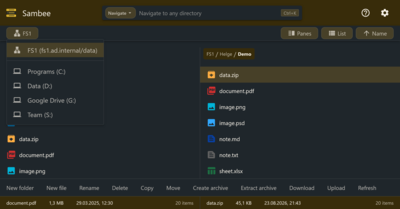
Dark Mode
This is not really new in 1.0 but I’m going to include it anyway 😉
Your Turn
I’ll end this post in the same way I ended the first Sambee post on this site.
Try it out. Take it for a spin. Let me know what you think. Start here:
- Website
- Documentation: Docker deployment
- Documentation: user guide
- Documentation: admin guide
Feedback Welcome
Submit your feedback via GitHub Discussions.





Comments