Measuring the Impact of Folder Redirection - Application Launch & SMB Version
- Windows Internals
- Published Dec 2, 2014 Updated Mar 26, 2019
This is the fifth in a series of articles on folder redirection by Aaron Parker, Helge Klein and Shawn Bass.
- Part one: How Folder Redirection Impacts UX & Breaks Applications
- Part two: Visualizing the Impact of Folder Redirection – Logon and Application Launch
- Part three: Visualizing the Impact of Folder Redirection – Start Menu Search
- Part four: Measuring the Impact of Folder Redirection – User Logon
- Part five: this article
Previously on this Series
If you have been following this mini-series you know that after explaining the basics in part one we got to the juicy bits in parts two and three, where we presented videos that vividly show that folder redirection indeed speeds up user logons considerably, but at the price of potentially horrible user experience during the session. In part four Aaron Parker published our measurements of how folder redirection affects logon duration. This fifth part is about the effect folder redirection and SMB version can have on application launch speed.
Evolution of SMB
After a long period of stagnation Microsoft started to invest in its SMB file sharing protocol again with Windows Vista and continued to make improvements with each new version of Windows. While lists of changes (Server 2008 R2, Server 2012 R2) may not sound too exciting, consider this: Microsoft now officially supports placing virtual machines and even SQL databases on SMB file shares. That would have been unthinkable only a few years ago and enables organizations to use centralized storage without the prohibitive costs of SANs.
SMB is critical infrastructure. Make sure you know which version you are running.
As long as you stay on Windows determining the version of SMB you are actually using is simple. As a rule of thumb: the newer, the better. And you definitely want to be off Windows XP and Server 2003 by now. For more details check out this blog article by Jose Barreto.
Also, while it is possible to disable specific versions of SMB - which can be useful for testing - do not be stupid enough to do that in production!
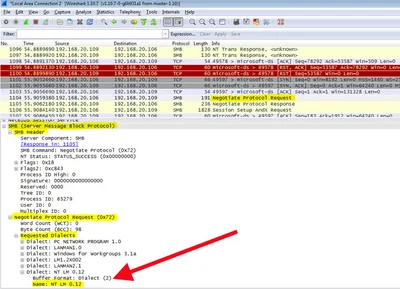
When part of your infrastructure is not running Windows, finding out which SMB version is used is not so simple any more. The wrong way to do it is to ask your storage guys. They probably do not know themselves, and even if they think they do, it might still be incorrect. The right and basically the only way to find out is to look at the network packets exchanged between SMB client and SMB server. While looking for Negotiate Protocol Request packets you do not want to see this (as it means you are using SMB1):
Application Launch Speed
Troubleshooting slow application startup can be tough, especially when the problem is difficult to reproduce. During the research for this series we wanted to quantify folder redirection’s potential for slowing application launches. To do so we used simple AutoIt scripts like the following to compute the time it took for the application’s main window to come up:
$begin = TimerInit()
Run("C:\Program Files (x86)\Mozilla Firefox\firefox.exe about:blank", "C:\Program Files (x86)\Mozilla Firefox", @SW_MAXIMIZE)
WinWait("Mozilla Firefox")
$dif = TimerDiff($begin)
$dif = ROUND($dif, 2)
MsgBox(0,"Launch (in ms)",$dif)
WinClose("Mozilla Firefox")
We started various applications in the following scenarios:
- Windows 7 client, no folder redirection
- Windows 7 client, folder redirection to Server 2003 - file server CPU 0%
- Windows 7 client, folder redirection to Server 2003 - file server CPU 50%
- Windows 7 client, folder redirection to Server 2003 - file server CPU 100%
- Windows 7 client, folder redirection to Server 2008 R2 - file server CPU 0%
- Windows 7 client, folder redirection to Server 2008 R2 - file server CPU 50%
- Windows 7 client, folder redirection to Server 2008 R2 - file server CPU 100%
During these tests the following folders were redirected: AppData, Desktop, Documents (including Music, Pictures and Videos), Downloads, Favorites and Start Menu. Each test was repeated five times. We used the mean value of those in our publications.
Redirection to a Very Busy File Server - SMB 2.1
Out of the scenarios described above the most interesting turned out to be 1 and 7. They show how application launch duration is affected by folder redirection to a very busy file server accessed over SMB 2.1:
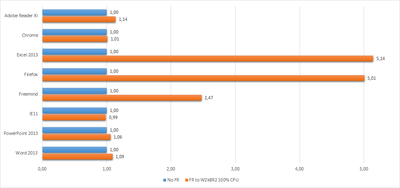
As you can see, many applications are not affected at all or only slightly, but some suffer a badly: Freemind launch duration increases by a factor of 2.5; Firefox and Excel by more than 5!
Adding SMB 1
Let us make one small tweak to the chart and add the results from scenario 4 (redirection to a busy file server running Windows Server 2003):
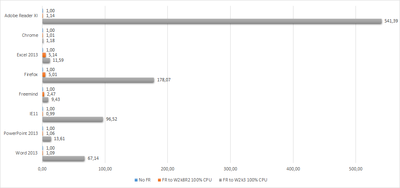
This is nothing less than shocking: most applications’ launch durations skyrocket! Take PowerPoint: not much affected by a busy SMB 2.1 file server, app startup times increase by more than 13x when SMB 1 is used to access redirected folders. Or Firefox: 178x launch time over SMB 1 compared to a mere 5x over SMB 2.1! But the most extreme example from our collection is Adobe Reader XI: redirection to a crippled SMB 2.1 server increases launch time by only 1.14. When redirecting to a crippled SMB 1 server, on the other hand, launch time increases by 541x.
Conclusion
The effects of folder redirection on application startup duration depend a lot on the file access patterns of the application. Some apps pretty much ignore file server overload conditions; others suffer degradations in launch performance of several hundred percent. The above is true only when the redirected folders reside on a file server accessed over the fairly modern SMB 2.1 protocol. If SMB 1 is used instead things get really bad, and that happens for nearly all applications. Let’s use an analogy: not using folder redirection is like fetching something from the same city. Redirection to a busy server over SMB 2.1 is like fetching stuff by flying from New York to San Francisco. Redirection to a busy server over SMB 1 is the same, except that you have to travel through the US of the 1800s.






Comments