Introducing Sambee, Your Browser-Based File Manager for SMB Shares and Local Drives
- Helge's Tools
- Published Jun 12, 2026
Sambee is a browser-based viewer and manager for files on SMB network shares and on your computer’s local drives. It supports single-pane and dual-pane views and can replace Windows File Explorer as well as Norton Commander-style tools on your PC and on your phone. And yes, it’s free and open source.
How It Started
My interest in browser-based file access and management tools was piqued when I set up my dockerized Samba file server. Wanting to access Samba’s file shares from my phone, too, I found existing free tools to be lacking in essential areas such as architecture, user experience, and capabilities. After first trying Filebrowser and then Filestash, neither of which left me satisfied, I finally decided to give it a go myself.
Sambee is like a GPS: you tell it where you want to go, and it takes you there.
Human Leadership, AI Execution
Developing a modern distributed app is far from trivial. Optimizing it for efficiency, speed, and UX doesn’t make the task any easier. Three very different components each require their own development ecosystem, test infrastructure, and security hardening: the Python backend, the TypeScript/React frontend, and the Tauri/Rust companion app.
Unlimited Interns - Strictly Supervised
What made this project possible was the advent of AI. As others have said before me, AI gives you unlimited interns, and those interns have learned to code better and better in the recent past. What AI doesn’t get is the “why” that ultimately drives all decisions. This means AI needs strong architectural, technical, and product management leadership, which is exactly the role I have in the development of Sambee. I specify, AI executes, and I review, test, and refine my specs. This has been working exceedingly well, as you can see from the resulting product.
Build quality is a feature.
Give Me the Good Stuff
So, what is Sambee good at and good for?
Build Quality
First of all, I’ve spent a lot of time on the details. I want a polished UI, smooth responsiveness, keyboard shortcuts that work intuitively, fast scrolling, and so on. In other words: I believe that build quality is a feature.
Access Your Files From Anywhere Without Cloud
It took me a while to realize that I neither need nor want a cloud-based or SaaS-like file sync and share tool for my data. An old-fashioned Samba file server does the job perfectly (and saves me from synchronization conflicts that inevitably happen). The main thing a file server doesn’t have is a web UI. With Sambee, that limitation is gone.
Fast Image Viewer
Sambee renders many types of images, even Photoshop and other complex types. And it does it fast. You’ll be hard-pressed to swipe through your image folders faster than Sambee can convert, transfer, and render them. Note that it all happens on the fly with fairly modest hardware requirements.
Browsers are considered to be closed systems. They’re not!
Markdown Editing
Since I like to work in Markdown, I made sure to integrate a Markdown viewer that shows documents beautifully rendered. But I didn’t stop there: a single click switches from viewer to rich-text editor. You may find that you need dedicated Markdown tools less and less.
File Management in the Browser
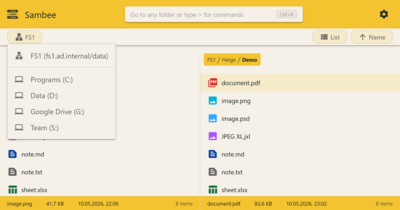
Sambee is not just a simple UI for your file server. It’s a full-blown file manager that’s running in your browser and works on all your devices: PC, tablet, phone, you name it.
Local Drive Access
This is something one wouldn’t think is possible. As you can see in the screenshot above, Sambee lets you access your local drives in the same way as network file shares. This is made possible by Companion, a small add-on that can optionally be installed on your PC to bridge the gap between Sambee in the browser and your local machine.
Native Editing
This is another feature Sambee pulls out of the hat. Browsers are supposed to be closed systems. Files that live in the browser can only be viewed and edited with tools available in the browser, right?
Not quite. With the help of Companion, Sambee can open a file in any installed desktop app for viewing and editing. When you’re done, your changes are saved back to the original storage location.
Instant Navigation
In most file managers, in order to move to a directory you need to know where in the hierarchy your target is located. You need to remember the entire route. With Sambee, you don’t. Sambee is like a GPS: you tell it where you want to go, and it takes you there.
Architecture
Sambee’s architecture is deliberately simple. The product consists of the following main components:
- Backend: A single lightweight Docker container.
- Communicates with file servers via SMB.
- Communicates with the frontend via HTTP(S).
- Manages settings, authentication, etc.
- Converts images and documents for viewing in the frontend.
- Frontend: The application’s UI in the browser.
- Communicates with the backend via HTTP(S).
- Communicates with Companion via HTTP (localhost only).
- Handles all user interaction.
- Companion: A lightweight helper app connecting the frontend with local drives and apps.
- Communicates with the frontend via HTTP (localhost only).
- Handles local drive access and native editing.
Security
Secure practices have been applied to every aspect of Sambee’s architecture and development. This includes:
- Authentication
- Communication with the frontend uses signed JWT bearer tokens
- Credential storage
- User passwords are stored only as hashes
- SMB credentials encrypted at rest
- Communication protocols
- SMB 2/3 protocol family; SMB1 not used
- Highest mutually supported SMB dialect used, up to SMB 3.1.1
- HTTPS via reverse proxy
- Dependency security
- Scheduled and manual dependency vulnerability audits
- Automated dependency updates with reviewed lockfiles
- Pinned and lockfile-driven dependency inputs for reproducible builds
- Companion
- Code signing (Windows: Authenticode)
- Secure browser-to-Companion pairing
- Pairing secrets stored in the OS credential store
- Signed auto-update artifacts with client-side verification
- Docker images
- Signed image digests
- Vulnerability scanning
- Published SPDX SBOM and provenance metadata
Your Turn
As its current version number, 0.7, indicates, Sambee is in beta. This means that while there may still be quirks and development may move quickly, you should definitely try it out. Take it for a spin. Let me know what you think. Start here:
- Website
- Documentation: user guide
- Documentation: admin guide
Feedback Welcome
Submit your feedback via GitHub Discussions.





Comments