How to Speed Up Your Windows 7 Boot Time by 20%
- Windows General
- Published Feb 7, 2012 Updated Feb 13, 2012
[What I wrote here is wrong. Please read this follow-up article.]
Here is a very simple way to reduce the time it takes to boot Windows 7 by around 20% (the exact number depends on the hardware).
I would never have thought the effect to be this drastic, but the simple graphical animation Windows 7 displays while booting to the logon screen slows down the startup process by several seconds! By disabling this effect we gain roughly 20% in boot speed. There are two ways to configure this.
Using a GUI
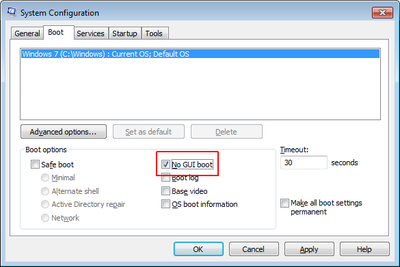
Run MSConfig.exe and check the box in front of “No GUI boot”:
From the Command Line
Issue the following command in an elevated command prompt:
bcdedit /set quietboot on
Caveats
I am not aware of any downsides of disabling the boot animation, except that the screen stays black while booting.
If you use BitLocker, make sure to suspend it prior to changing boot settings. You can resume it after the reboot. If you forget this, you will be prompted to enter your BitLocker recovery key each time the system starts up.
This setting has no effect on Windows Server 2008 R2, by the way.





Comments