How to Make Google Chrome Search via SSL/HTTPS by Default
- Security
- Published Feb 1, 2012
A while ago I wrote about the dangers of using unencrypted Wi-Fi networks. Right now I am connected to such a network and trying hard not to give away authentication cookies or passwords - information that would make it trivial even for amateurs to take over one or several of my accounts.
Some of my most heavily used services are SSL only anyway - Google Mail, Google Reader and Google Calendar. But these services require that I be logged on to Google, sending my authentication cookie to any Google service. And guess which service does not use SSL by default: search.
To be crystal clear: If you are a Google Mail user like me and connect to an unencrypted Wi-Fi network, your account may be compromised the second you perform your first Google search.
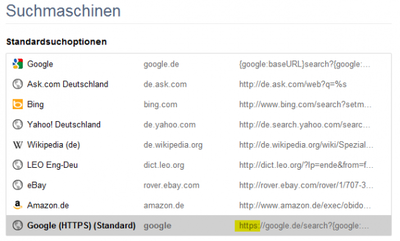
So what can be done? Simple, make Google Chrome search via SSL. In Chrome 16 go to the settings menu -> Options -> Search -> Manage search engines. A new popup window opens. You will notice that Google is the default search engine, and that you cannot change its search URL from HTTP to HTTPS. But you do not need to. Simply copy the URL and create a new entry, replacing {google:baseURL} with https://google.de/. In my case I created a new search engine entry with the following parameters:
Google (HTTPS)
google
https://google.de/search?{google:RLZ}{google:acceptedSuggestion}{google:originalQueryForSuggestion}{google:searchFieldtrialParameter}{google:instantFieldTrialGroupParameter}sourceid=chrome&ie={inputEncoding}&q=%s
After you created the new search engine entry, hover over it and then click to make it the default search engine. It should now look similar to this:







Comments