Hardware-Encode Video in H.265 with Free Tools to Save Disk Space
- Tips and Tools
- Published Feb 11, 2019 Updated Oct 12, 2020
Many web meeting services have a recording functionality. Most recordings are provided as MP4 files with the video encoded in H.264 because that offers the most universal compatibility. However, it also needs a lot of disk space. H.264 has a successor, H.265, which only requires half the space for the same visual quality. This post shows how to use StaxRip, a free tool, to re-encode H.264 video into H.265 quickly by making use of GPU hardware encoding.
Preparation
- Download and extract StaxRip. I used the current stable version 1.7 x64
- Start StaxRip
- When opening the first video file, StaxRip may ask you to install AviSynth. Do so by clicking Install AviSynth+.
Configuring the Conversion Settings
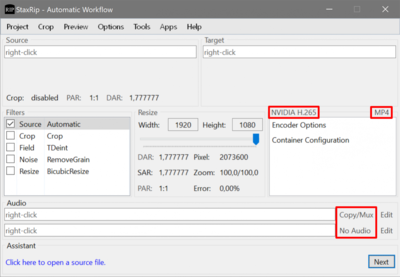
- Click x264 and choose one of the following depending on your GPU vendor: NVIDIA H.265, Intel H.265 or AMD H.265
- Click MKV and select MP4 (mp4box) instead
- Click the Opus entry next to the first audio stream field and select copy/mux
- Click the Opus entry next to the first audio stream field and select no audio
The result should look like this:
Performing the Conversion
- Right-click Source > Open > File Batch and select the files you want to convert
- Click Next to start the conversion
- The output files are placed in the same directory as the input files with the extension _new
Conversion Performance
The Nvidia GTX 1060 GPU in my desktop PC encoded H.265 at the impressive rate of approximately 420 frames per second (full HD, 1920x1080). The Intel HD Graphics 620 (Core i7-7500U) in my laptop only reached about 113 frames per second for the same content. Still impressive, but a lot less fast.
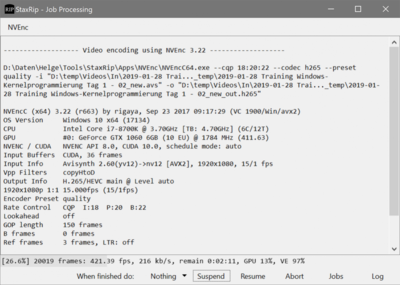
An interesting difference between the two GPUs: while the Nvidia encode used the GPU’s dedicated video encoding engine, the Intel encode used the GPU’s generic 3D engine.
Another noteworthy difference: the file generated by the Intel encode was 38% smaller than the file generated by the Nvidia encode.
Space Savings
The original videos of a four-day training recorded with Skype had a size of 7.6 GB. Converted to H.265 the size was reduced to 2.4 GB, which amounts to 68% savings!
GPU Performance Monitoring
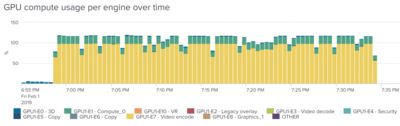
If you are interested in monitoring your GPU’s performance and find out how its various engines are used, take a look at our uberAgent product. During the Nvidia encoding, for example, the GPU’s video encoding engine was nearly at 100% load and its generic compute engine at approximately 20%:





Comments