Free and Powerful Equalizer for Windows 10

Windows 10 does not come with an equalizer. That can be annoying when you have headphones that are too heavy on the bass, like the Sony WH-1000XM3. Enter the free Equalizer APO with Peace, its UI.

What You Get

Peter’s Equalizer API Configuration Extension (Peace) is pretty easy to use while offering powerful features:

  • Slider changes have an immediate effect
  • Settings can be applied to invididual devices only
  • Great flexibility
  • Saved configurations
  • Easy backup and restore of configurations
  • Can be started at logon so that configured settings are always applied

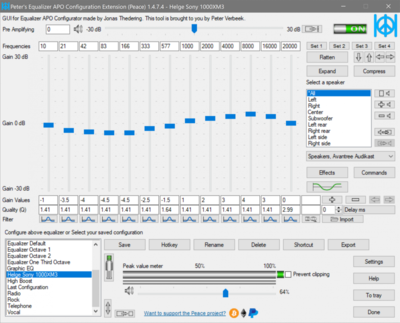
The UI looks like this (showing my adjustments for the Sony WH-1000XM3):
Installation

Installation is straightforward. Just make sure to install in the following order

  1. Engine: Equalizer APO
  2. UI: Peace Equalizer

Enjoy!

Comments

Related Posts

What's Wrong with Group Policy

What's Wrong with Group Policy
Over the years I have worked with Group Policy in many different ways. My experience ranges from helping an enterprise client establish a brand new set of policies for physical PCs and VDI machines to authoring ADM/ADMX/ADML files. Last year I presented and wrote a very detailed analysis of the impact of Group Policy on user logon performance (blog posts). Along the way I learned a lot about the strengths but also about the weaknesses of Group Policy. This article is an account of the latter.
Windows General

Latest Posts

Fast & Silent 5 Watt PC: Minimizing Idle Power Usage

Fast & Silent 5 Watt PC: Minimizing Idle Power Usage
This micro-series explains how to turn the Lenovo ThinkCentre M90t Gen 6 into a smart workstation that consumes only 5 Watts when idle but reaches top Cinebench scores while staying almost imperceptibly silent. In the first post, I showed how to silence the machine by replacing and adding to Lenovo’s CPU cooler. In this second post, I’m listing the exact configuration that achieves the lofty goal of combining minimal idle power consumption with top Cinebench scores.
Hardware

Fast & Silent 5 Watt PC: Lenovo ThinkCentre M90t Modding

Fast & Silent 5 Watt PC: Lenovo ThinkCentre M90t Modding
This micro-series explains how to turn the Lenovo ThinkCentre M90t Gen 6 into a smart workstation that consumes only 5 Watts when idle but reaches top Cinebench scores while staying almost imperceptibly silent. In this first post, I’m showing how to silence the machine by replacing and adding to Lenovo’s CPU cooler. In a second post, I’m listing the exact configuration that achieves the lofty goal of combining minimal idle power consumption with top Cinebench scores.
Hardware