Fixing IPv6 Intermittent Packet Loss Caused by Windows Firewall
- Networking
- Published Oct 16, 2025
This article shows a simple solution to a weird networking problem that plagued me for hours: IPv6 packets were sometimes lost; IPv4 was not affected.
Problem: IPv6 Ping Timeouts and Packet Losses
Symptom: Teams Issues
I noticed the problem first when there were intermittent connectivity issues in Teams during a meeting.
Ping for Diagnosis
Analyzing the problem later, I found that a simple continuous ping illustrated the symptoms nicely: IPv6 pings would sometimes fail (with request timed out) while IPv4 pings were rock solid.
Ruling out Potential Causes
I first suspected my ISP, until I noticed that other devices weren’t affected. So I focused on the one machine showing the symptoms.
I went through all the usual steps, even uninstalled several older applications and disabled a suspicious network filter driver, all to no avail.
Solution: Restore Defaults of Windows Defender Firewall
If you observe similar symptoms as I described above, test if your root cause is the same as mine by temporarily disabling Windows Firewall. If the issues goes away, proceed. If not you’ll have to look for other potential solutions, I’m afraid.
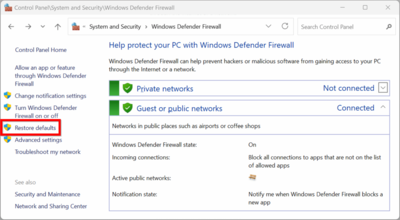
Now on to the actual solution. Open the Windows Defender Firewall control panel applet (firewall.cpl). On the left-hand side you’ll notice a Restore defaults link. Click it. You’ll get a warning that all your firewall rule customizations will be lost.
Take that seriously and pause to think if there’s anything customized in your firewall config.
If you’re sure you don’t need anything from your current firewall setting anymore, go ahead.
That fixed the issues for me immediately.





Comments