Find in Files With Grep-Like Context (Lines Surrounding Matches)
- Tips and Tools
- Published Mar 31, 2020 Updated Apr 12, 2020
I sometimes need all occurrences of a search string in the files of a directory. OK, that’s easy. Here’s the difficult part: I need search results displayed with context around the matching lines. In other words: I need to know what is in the lines above and/or below the results. None of the text editors and IDEs I am using regularly seem to be able to do display search results with context lines. Enter AstroGrep.
AstroGrep
AstroGrep is a free and open-source graphical variant of the grep command-line tool. AstroGrep supports grep’s -C context parameter.
Downloading AstroGrep via HTTPS
Most of AstroGrep’s web pages are unfortunately only available via unencrypted HTTP. To download the tool over a secure connection use this direct SourceForge link. Both portable and setup variants are available in the version folders.
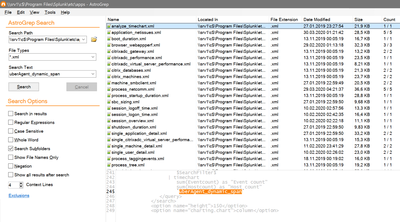
Searching With AstroGrep
AstroGrep’s UI is pretty much self-explanatory and clutter-free as you can see in the screenshot above. The context lines feature I was looking for can be seen in the lower-left corner. The lower-right corner shows those context lines for the currently selected file from the result set.
While navigating the list of search results you can right-click a result you are not interested in and choose to remove it from the list. Once you are happy with the results in the list select them all and click Edit > Open Selected Files to further process them in an editor.
Alternatives That Did Not Work For Me
Before looking at AstroGrep I tried to find the context lines functionality in Notepad++ and VS Code.
Notepad++
Apparently, the TextFX plugin for Notepad++ provided grep-like functionality. However, it is not available officially any more, at least not for the 64-bit version of Notepad++.
VS Code
The built-in find in files function does not come with the ability to display context lines. This might be available through an extension, but I did not check. If you know of a solution tell us by commenting below.






Comments